Using the Export.XHTML.UseTemplate property
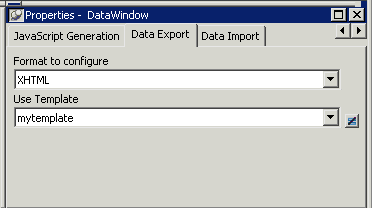
The Data Export page in the Properties view lets you set
properties for exporting data in XHTML. The names of all templates
that you create and save for the current DataWindow object display in
the Use Template drop-down list.
In addition to the properties that you can set on this page, you
can use the Export.XHTML.TemplateCount and Export.XHTML.Template[
].Name properties to let the user of an application select an export
template at runtime. See “Selecting XHTML
export templates at runtime”.
You can specify the template you want to apply to the default
XML Web DataWindow or XHTML Web DataWindow generation at runtime by
setting the Export.XHTML.UseTemplate property. You set the property
using the Data Export tab in the DataWindow painter’s Properties view
by selecting XHTML as the format and then selecting the XHTML export
template’s name from the Use Template drop-down list box.
You can also set the Export.XHTML.UseTemplate DataWindow
property in script. For information, see “Selecting XHTML export templates at
runtime”.
Incorrect setting of the UseTemplate property
If you set the Export.XHTML.UseTemplate property at runtime to
the name of a template that does not exist, the built-in default
Template is used on an export.