Using the DEBUG preprocessor symbol
You can use the syntax #IF DEFINED followed by a predefined
preprocessor symbol to mark a block of code for specialized processing
before it is compiled. The block of conditional code is automatically
parsed by a PowerBuilder preprocessor before it is passed to the
compiler. Most of the predefined preprocessor symbols are used only
for .NET targets, but the DEBUG symbol can be used in standard
PowerBuilder targets as well.
The symbol is useful if you want to add code to your application
to help you debug while you are testing the application. For example,
you might add a block like the following:
|
1 2 3 |
#if defined DEBUG then MessageBox("Debugging","Ctr value is " + string(i)) #end if |
When you run or debug the application in the development
environment, the code is always parsed and you always see the message
box. When you run the executable file, the code is parsed only if the
DEBUG symbol is enabled on the General page in the Project painter.
While you are still testing the application, turning the DEBUG symbol
can help you find differences in behavior in the development
environment and the executable file.
Although you would not typically enable the DEBUG symbol in a
release build, if a problem is reported in a production application,
you can redeploy the release build with the DEBUG symbol enabled to
help determine the nature or location of the problem.
Adding breakpoints in a DEBUG
block
When you use the DEBUG symbol, you can add breakpoints in the
DEBUG block only for lines of code that are not in an ELSE clause that
removes the DEBUG condition. If you attempt to add a breakpoint in the
ELSE clause, the debugger automatically switches the breakpoint to the
last line of the clause defining the DEBUG condition. Consider this
code:
|
1 2 3 4 5 |
#if defined DEBUG then /*debugging code*/ #else /* other action*/ #end if |
In this example, if you add a breakpoint to the line /* other
action*/, the breakpoint would automatically switch to the line
/*debugging code*/.
Code in ELSE clause is parsed
Note that any code that you place in the ELSE clause will be
parsed by the compiler when you build an executable file with the
DEBUG symbol disabled.
Pasting a DEBUG block into a
script
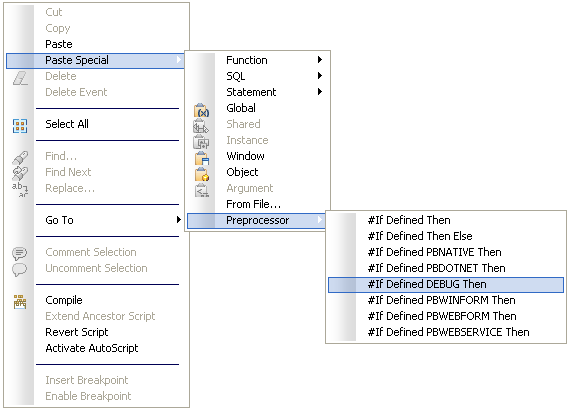
You can use the Paste Special>Preprocessor>#If Defined
DEBUG Then pop-up menu item in the Script view to paste a template
into a script.
Limitations
Conditional compilation is not supported in DataWindow syntax,
structure or menu objects. You cannot edit the source code for an
object to include conditional compilation blocks that span function,
event, or variable definition boundaries.
You must rebuild your application after you add a DEBUG
conditional block.