Using stored procedures to update the database
Updates to the database can be performed using stored
procedures.
Why use stored procedures?
The DataWindow control submits updates to the database by
dynamically generating INSERT, DELETE, and UPDATE SQL statements after
determining the status of each row in the DataWindow object. You can
also define procedural SQL statements in a stored procedure for use by
all applications accessing a database. Using stored procedures to
perform database updates allows you to enhance database security,
integrity, and performance. Since stored procedures provide for
conditional execution, you can also use them to enforce additional
business rules.
Updating using stored
procedures
The Stored Procedure Update dialog box only allows you to
associate an existing stored procedure with your DataWindow object. The
stored procedure must have been previously defined in the
database.
To use stored procedures to update the database
-
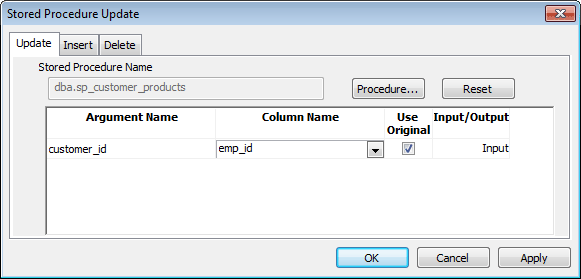
In the DataWindow painter, select Rows>Stored Procedure
Update to display the Stored Procedure Update dialog box. -
Select the tab for the SQL update method (Delete, Insert, or
Update) with which you want to associate a stored procedure. -
Click the Procedure button, select the stored procedure you
want to have execute when the SQL update method is generated, and
click OK.The parameters used in the stored procedure are displayed in
the Argument Name list in the order in which they are defined in the
procedure. Column Name lists the columns used in your DataWindow
object. -
Associate a column in the DataWindow object or an expression
with a procedure parameter.If a stored procedure uses parameters that are not matched to
column names, you can substitute the value from a DataWindow object
computed field or expression.
Matching a column to a procedure parameter
You must be careful to correctly match a column in the
DataWindow object to a procedure parameter, since PowerBuilder is able
to verify only that datatypes match.
If the parameter is to receive a column value, indicate whether
the parameter will receive the updated column value entered through the
DataWindow object or retain the original column value from the
database.
Typically, you select Use Original when the parameter is used in a
WHERE clause in an UPDATE or DELETE SQL statement. If you do not select
Use Original, the parameter will use the new value entered for that
column. Typically, you would use the new value when the parameter is
used in an INSERT or UPDATE SQL statement.
What happens when the stored procedure is
executed
The stored procedure you associate with a SQL update method in the
Stored Procedure Update dialog box is executed when the DataWindow
control calls the UpdateData method. The DataWindow control examines the
table in the DataWindow object, determines the appropriate SQL statement
for each row, and submits the appropriate stored procedure (as defined
in the Stored Procedure Update dialog box) with the appropriate column
values substituted for the procedure arguments.
If a stored procedure for a particular SQL update method is not
defined, the DataWindow control submits the appropriate SQL
syntax.
Return values from procedures cannot be handled by the DataWindow
control. The UpdateData method returns 1 if it succeeds and -1 if an
error occurs. Additional information is returned to SQLCA. Additional
information is passed as a DBErrorException to the caller.
Using Describe and Modify
You can use the DataWindow Describe and Modify methods to access
DataWindow property values including the stored procedures associated
with a DataWindow object. For information, see the DataWindow object
property Table.property in the section called “Table.property” in DataWindow Reference.
Restrictions on the use of
Modify
Since a database driver can only report stored procedure names and
parameter names and position, it cannot verify that changes made to
stored procedures are valid. Consequently, if you use Modify to change a
stored procedure, be careful that you do not inadvertently introduce
changes into the database.
In addition, using Modify to enable a DataWindow object to use
stored procedures to update the database when it is not already using
stored procedures requires that the type qualifier be specified first.
Calling the type qualifier ensures that internal structures are built
before subsequent calls to Modify. If a new method or method arguments
are specified without a preceding definition of type, Modify
fails.