Using a Web service to update the database (Obsolete)
You can use a DataWindow with a Web service data source to update
a database. Support for updating data requires one or more WSDL files
that describe methods and parameters that can be called by the
DataWindow engine for insert, delete, or update operations.
Generating or selecting an
assembly
The WSDL files are not required on runtime computers. They are
used to generate assembly files that are deployed with the application.
If you have an existing assembly file that allows you to update data in
your DataWindow objects, you can select that assembly instead of
generating a new one from the Web Services Update dialog box. You can
generate or select separate assemblies for insert, delete, and update
operations.
Insert, delete, and update
operations
The insert, delete, and update operations imply different things
depending on the original data source. When you insert a DataWindow row
for an RDBMS, a new row is added to the database; when the data source
is an array of structures, a new structure instance is added to the
array; and when the data source is an array of simple types, a new
instance of the simple type is added to the array. The delete operation
removes a database row or an instance in an array, and the update
operation modifies a database row or an instance in an array.
For each operation, you must map DataWindow column values or
expressions to Web service input parameters. At runtime when performing
one of these operations, the DataWindow binds column or expression
values to parameters as instructed and calls the Web service method. The
DataWindow engine does not know what actually happens in the Web service
component (that is, how the component implements the update), only
whether it returns a success or failure message.
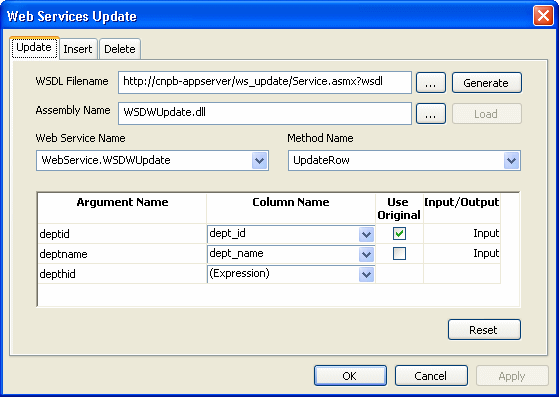
The following figure displays the Web Service Update dialog box.
You use this dialog box to bind to Web service parameters to DataWindow
columns or expressions. Unlike the retrieve call, DataWindow update
operations can handle bidirectional parameters. However, you can select
an expression or computed column only for an update method input
parameter.
To use a Web service to update the database
-
In the DataWindow painter, select Rows>Web Service Update
to display the Web Service Update dialog box. -
Select the tab for the Web service update method (Update,
Insert, or Delete) with which you want to associate a Web
service. -
Click the browse button next to the WSDL Filename text box to
browse to a WSDL file describing the Web service you want to use to
update the DataWindow, and click OK.You use a WSDL file to generate an assembly that you can
deploy with your Web service DataWindow application. You can
override the default assembly name that will be generated if you
enter an existing assembly in the following step of this
procedure.If you already have an assembly that you want to use to update
the DataWindow, you can skip the current step and select the
assembly that you want in step 4.You can use the Reset button to clear all entries in the Web
Service Update dialog box. -
(Optional) Type an assembly name in the Assembly Name text box
to override a default assembly name that you want to generate from a
WSDL file, or browse to an existing assembly file that describes the
Web service you want to use to update the DataWindow, and click
OK.Although you can browse to any mapped directory to find an
assembly file for update operations, you must make sure to copy the
assembly under the current target directory. All assemblies for
retrieving and updating a Web service DataWindow must be deployed to
the same directory as the application executable file, or retrieve
and update operations will not be able to work at runtime. -
Click Generate if you want to generate and load an assembly
file, or click Load if you entered an existing assembly file name in
step 4.After you click Generate, an assembly file is created with a
default name from the WSDL file or from a name that you entered in
the previous step.After you generate the assembly from a WSDL file or load an
existing assembly, the Web services in that file are added to the
Web Service Name drop-down list and the methods for the Web services
are added to the Method Name drop-down list. -
Select a Web service name and method name from the list of Web
services and methods.The parameters used in the Web service method are displayed in
the Argument Name list in the order in which they are defined.
Column Name lists the columns used in your DataWindow object. -
Associate a column in the DataWindow object or an expression
with a method parameter.If a Web service method uses parameters that are not matched
to column names, you can substitute the value from a DataWindow
object computed field or expression.
Matching a column to a Web service method parameter
You must be careful to correctly match a column in the
DataWindow object to a method parameter, since PowerBuilder is able to
verify only that datatypes match.
If the parameter is to receive a column value, indicate whether
the parameter will receive the updated column value entered through the
DataWindow object or retain the original column value from the
database.
Typically, you select Use Original when the Web service parameter
is used in the WHERE clause of an UPDATE or DELETE SQL statement for a
Web service method. If you do not select Use Original, the parameter
uses the new value entered for that column. Typically, you would use the
new value when the Web service parameter is needed for an INSERT SQL
statement for the method, or if it is set in an UPDATE SQL
statement.
Regenerating an
assembly
If you need to regenerate an assembly for a DataWindow that uses a
Web service data source for retrieval, update, insert, or delete
operations, you must add the following line to the [DataWindow] section
of the PB.INI file:
|
1 |
GenerateWSAssembliesOnCompile=YES |
After you set this property in the PB.INI file, PowerBuilder
regenerates the assembly on each compilation of the target containing
the DataWindow.
Using the WSError event
Because a DataWindow with a Web service data source does not pass
back failure messages in a return code during retrieve, insert, or
update operations, you must use the WSError event to obtain such error
information.
For more information on the WSError event, see the section called “WSError (Obsolete)” in DataWindow Reference.
The WebServiceException
object
Because a DataWindow with a Web service data source does not pass
back failure messages in a return code during retrieve, insert, or
update operations, you must use the WebServiceException object to obtain
such error information. The parameters in the following table are
exposed in the WebServiceException object when an error occurs:
|
Argument |
Description |
|---|---|
|
operation |
String for the type of operation (Retrieve, Update, |
|
rowNumber |
Int32 for the row number or 0 if not applicable, |
|
buffername |
String for the name of the buffer being accessed |
|
assembly |
String for the name of the assembly being |
|
method |
String for the name of the Web service method |
|
returnCode |
Int32 for the return code from the Web |