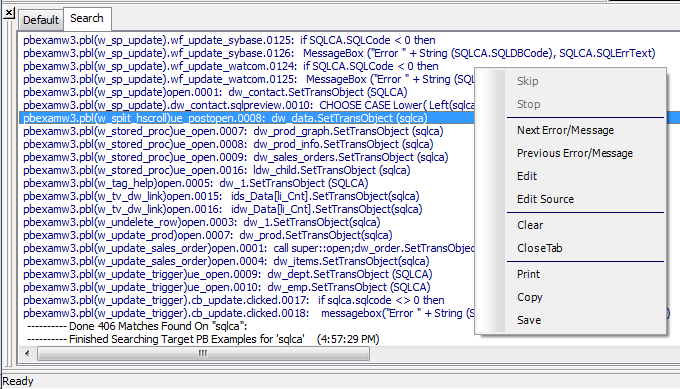
The Output window
The output of a variety of operations (migration, builds,
deployment, project execution, object saves, and searches) displays in
the Output window.
When you start a new PowerBuilder session, the Output window has
a single tab, Default. New tabs are added as you perform
operations.
|
Tab |
Contents |
|---|---|
|
Default |
General information about the progress of full or |
|
Debug |
Debugger output, including the paths of |
|
Errors |
Messages that indicate problems that prevent the |
|
Warnings |
Warning and informational messages |
|
Search |
Output from search operations |
|
Unsupported features |
For .NET targets, names and locations of features |
Using the Output window
You can hide or display the Output window with the Output button
on the PowerBar or by selecting Window>Output.
You control operations in the window using the Skip, Stop, Next
Error, and Previous Error buttons or menu options.
Tabs display in the order in which they are created and remain
in the Output window for the rest of the PowerBuilder session. To
clear the output from the tabs automatically when you start a new
build, make sure that the Automatically Clear Output Window check box
on the General page of the System Options dialog box is selected. You
can also clear and close tabs manually from the pop-up menu.
When appropriate, lines in the Output window provide links that
invoke the correct painter when you double-click on that line. The
pop-up menu also provides the options Edit and Edit Source to open an
object in a painter or the Source editor. You can copy the contents of
the current tab to the Windows clipboard, save its contents to a text
file, or print its contents to your default printer.