Step 4: specify the default global variable type for
SQLCA
In the Application painter, you must specify the user object you
defined as the default global variable type for SQLCA. When you execute
your application, this tells PowerBuilder to use your standard class
user object instead of the built-in system Transaction object.
Using your own Transaction object instead of SQLCA
This procedure assumes that your application uses the default
Transaction object SQLCA, but you can also declare and create an
instance of your own Transaction object and then write code that calls
the user object as a property of your Transaction object. For
instructions, see the section called “Working with User Objects” in Users Guide.
To specify the default global variable type for SQLCA:
-
Click the Open button in the PowerBar, or select File>Open
from the menu bar.The Open dialog box displays.
-
Select Applications from the Object Type drop-down list.
Choose the application where you want to use your new user object
and click OK.The Application painter workspace displays.
-
Select the General tab in the Properties view. Click the
Additional Properties button.The Additional Properties dialog box displays.
-
Click the Variable Types tab to display the Variable Types
property page. -
In the SQLCA box, specify the name of the standard class user
object you defined in Steps 1 through 3: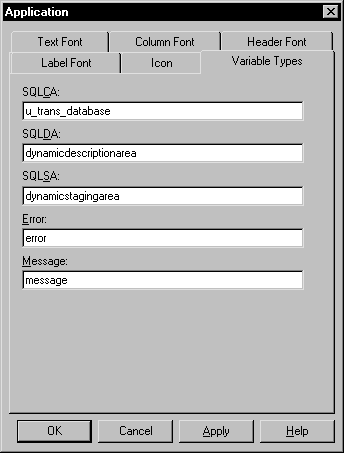
-
Click OK or Apply.
When you execute your application, PowerBuilder will use the
specified standard class user object instead of the built-in system
object type it inherits from.