Step 1: define the standard class user object
To define the standard class user object:
-
Start PowerBuilder.
-
Connect to a database that supports stored procedures.
The rest of this procedure assumes you are connected to an
Oracle database that contains remote stored procedures on the
database server.For instructions on connecting to an Oracle database in
PowerBuilder and using Oracle stored procedures, see Using
Oracle in Connecting to Your Database. -
Click the New button in the PowerBar, or select File>New
from the menu bar.The New dialog box displays.
-
On the Object tab, select the Standard Class icon and click OK
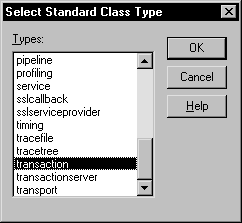
to define a new standard class user object.The Select Standard Class Type dialog box displays:
-
Select transaction as the built-in system type that you want
your user object to inherit from, and click OK.The User Object painter workspace displays so that you can
assign properties (instance variables) and functions to your user
object: