Starting the
pipeline
Contents
With the setup chores taken care of, you can now start the execution
of your pipeline.
To start pipeline execution:
-
Code the Start function in an appropriate script. In this
function, you specify:-
The Transaction object for the source database
-
The Transaction object for the destination database
-
The DataWindow control in which you want the Start function
to display any error rowsThe Start function automatically associates the PowerBuilder
pipeline-error DataWindow object with your DataWindow control when
needed. -
Values for retrieval arguments you have defined in the
Pipeline objectIf you omit these values, the Start function prompts the
user for them automatically at runtime.
-
-
Test the result of the Start function.
For more information on coding the Start function, see the section called “Start” in PowerScript Reference.
Example
The following sample code starts pipeline execution in the order
entry application.
Calling the Start function
When users want to start their selected pipeline, they click the
cb_write CommandButton in the w_sales_extract window:
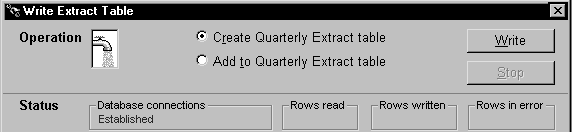
This executes the Clicked event of cb_write, which contains the
Start function:
|
1 2 3 4 |
// Now start piping. integer li_start_result li_start_result = iuo_pipe_logistics.Start & (itrans_source,itrans_destination,dw_pipe_errors) |
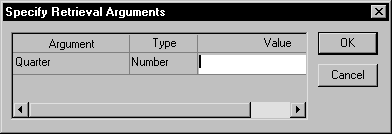
Notice that the user did not supply a value for the pipeline’s
retrieval argument (quarter). As a consequence, the Start function prompts
the user for it:
Testing the result
The next few lines of code in the Clicked event of cb_write check
the Start function’s return value. This lets the application know whether
it succeeded or not (and if not, what went wrong):
|
1 2 3 4 5 6 7 8 9 10 11 12 13 14 15 |
CHOOSE CASE li_start_result CASE -3 Beep (1) MessageBox("Piping Error", & "Quarterly_Extract table already exists ... RETURN CASE -4 Beep (1) MessageBox("Piping Error", & "Quarterly_Extract table does not exist ... RETURN ... END CHOOSE |