SQL expression examples
The first six examples in this section all refer to a grid
that contains three columns from the employee table: emp_id,
dept_id, and salary.
Example 1
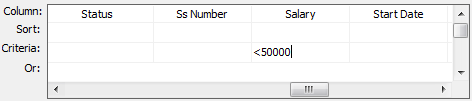
The expression <50000 in the Criteria row in the salary
column in the grid retrieves information for employees whose
salaries are less than $50,000.
The SELECT statement that PowerBuilder creates is:
|
1 2 3 4 5 |
SELECT employee.emp_id, employee.dept_id, employee.salary FROM employee WHERE employee.salary < '50000' |
Example 2
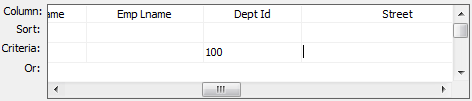
The expression 100 in the Criteria row in the DeptId column in
the grid retrieves information for employees who belong to
department 100.
The SELECT statement that PowerBuilder creates is:
|
1 2 3 4 5 |
SELECT employee.emp_id, employee.dept_id, employee.salary FROM employee WHERE employee.dept_id ='100' |
Example 3
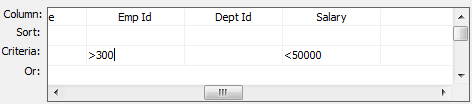
The expression >300 in the Criteria row in the EmpId column
and the expression <50000 in the Criteria row in the Salary
column in the grid retrieve information for any employee whose
employee ID is greater than 300 and whose salary is less than
$50,000.
The SELECT statement that PowerBuilder creates is:
|
1 2 3 4 5 6 |
SELECT employee.emp_id, employee.dept_id, employee.salary FROM employee WHERE (employee.emp_id >'300') AND employee.salary <'50000' |
Example 4
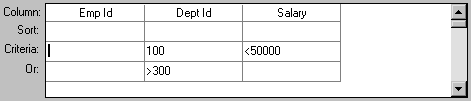
The expressions 100 in the Criteria row and >300 in the Or
row for the DeptId column, together with the expression <50000 in
the Criteria row in the Salary column, retrieve information for
employees who belong to:
-
Department 100 and have a salary less than $50,000
or
-
A department whose ID is greater than 300, no matter what
their salaries
The SELECT statement that PowerBuilder creates is:
|
1 2 3 4 5 6 7 |
SELECT employee.emp_id, employee.dept_id, employee.salary FROM employee WHERE (employee.dept_id = '100') AND (emplyee.salary < '50000')OR (employee.dept_id > '300') |
Example 5
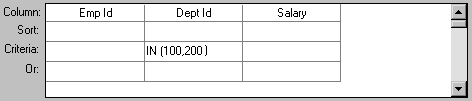
The expression IN(100,200) in the Criteria row in the DeptId
column in the grid retrieves information for employees who are in
department 100 or 200.
The SELECT statement that PowerBuilder creates is:
|
1 2 3 4 5 |
SELECT employee.emp_id, employee.dept_id, employee.salary FROM employee WHERE employee.dept_id IN ('100,200') |
Example 6
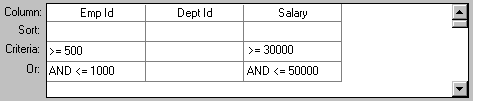
This example shows the use of the word AND in the Or criteria
row. In the Criteria row, >=500 is in the EmpId column and
>=30000 is in the Salary column. In the Or row, AND <=1000 is
in the EmpId column and AND <=50000 is in the Salary column.
These criteria retrieve information for employees who have an
employee ID from 500 to 1000 and a salary from $30,000 to
$50,000.
The SELECT statement that PowerBuilder creates is:
|
1 2 3 4 5 6 7 8 |
SELECT employee.emp_id, employee.dept_id, employee.salary FROM employee WHERE (((employee.emp_id >='500') AND (employee.salary >='30000') AND (employee.emp_id <='1000') AND (employee.salary <='50000'))) |
Example 7
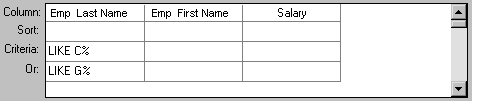
In a grid with three columns: emp_last_name, emp_first_name,
and salary, the expressions LIKE C% in the Criteria row and LIKE G%
in the Or row in the emp_last_name column retrieve information for
employees who have last names that begin with C or G.
The SELECT statement that PowerBuilder creates is:
|
1 2 3 4 5 6 |
SELECT employee.emp_last_name, employee.emp_first_name, employee.salary FROM employee WHERE (((employee.emp_last_name LIKE 'C%'))OR ((employee.emp_last_name LIKE 'G%'))) |
Providing SQL functionality to
users
You can allow your users to specify selection criteria in a
DataWindow object using these techniques at runtime:
-
You can automatically pop up a window prompting users to
specify criteria each time, just before data is
retrieved.For more information, see Enhancing DataWindow Objects.
-
You can place the DataWindow object in query mode using
the Modify method.For more information, see the section called “Providing
query ability to users” in DataWindow Programmers Guide.