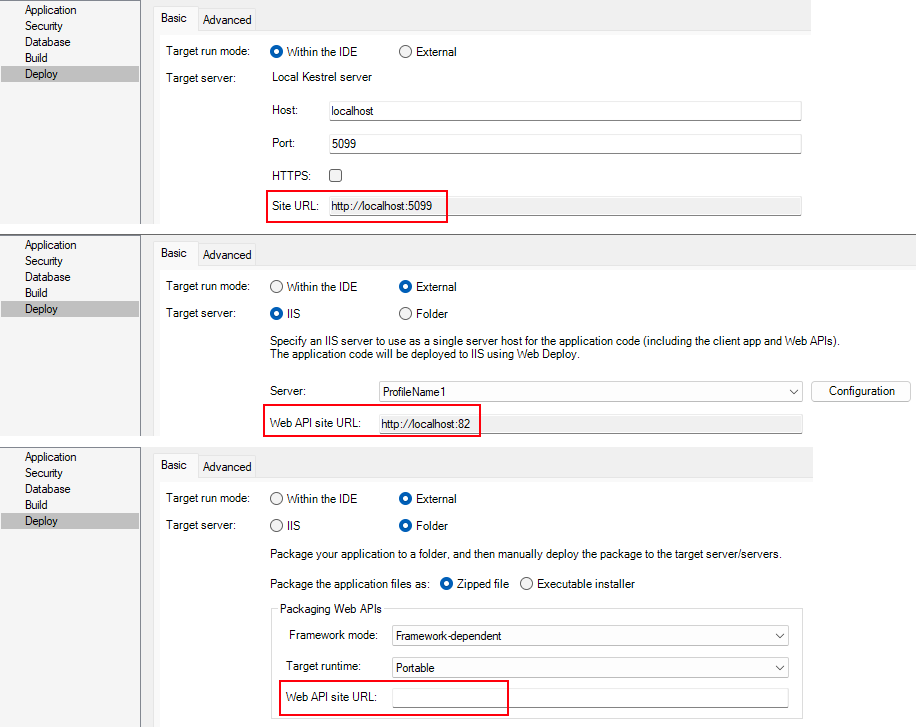
Specify the Web API URL
For the installable cloud application to run successfully, you
need to tell the client app where the Web APIs is hosted and
run.
In the Deploy > Basic tab, you can specify the Web API site URL
for the application.
-
To deploy to the local Kestrel server, the site URL is
automatically generated using the host and port; and this site URL
is directly used as the Web API site URL, and it is also used to
formulate the application URL automatically. -
To deploy to IIS, you can click the Configuration button to specify the site
URL or leave it empty. This site URL is directly used as the Web
API site URL, and it is also used to formulate the application URL
(the client app is deployed with the Web APIs by default). -
To package the application to a folder, you can specify the
Web API site URL or leave it empty.
If you have not specified the site URL, the Web API URL is set
to http://localhost by default, and you can change this value in the
client app > apprun.json file after the application is
deployed or packaged.
The Web API URL indicates the root URL of the PowerServer Web
APIs, for example, https://172.16.10.10:5099. It is highly recommended
that you specify an HTTPS URL for the
production environment.
Using “localhost” is only appropriate for the development
environment when the installable cloud app is deployed to the local
machine. The best practice would be to specify the IP address or
domain name no matter in the development environment or production
environment.
Note
Exception: if you use a self-signed certificate in the
development environment, the self-signed certificate will only work
with “localhost” but NOT the IP address or domain name. For more,
refer to Support HTTPS.