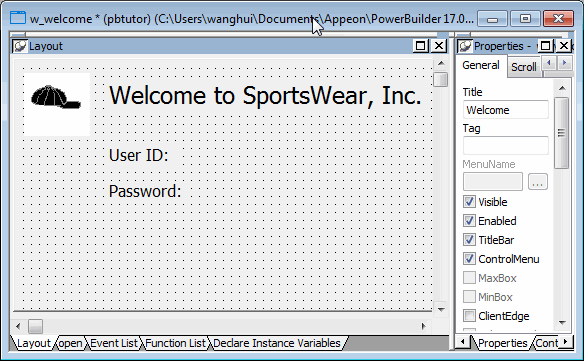
Specify properties of the
StaticText controls
Now you specify the properties of the StaticText controls (label
text boxes) to define how they should appear on the login window.
-
Select the first StaticText control you added by clicking on
it.The Properties view displays properties of the StaticText
control. If you do not see the Properties view, select
View>Properties from the menu bar. -
Select the text st_1 in the Name text box on the General page
of the Properties view.Type st_welcome in the Name text box.
Now the control has a more descriptive name. The prefix st_ is
standard for StaticText controls. -
Select the text none in the Text text box.
Type Welcome to SportsWear, Inc.
If you press Enter, click to another field or tab to another
page in the Properties view, or click in a different view, the text
you typed replaces none in the Layout view. -
Click the Font tab in the Properties view.
Change the TextSize property for this control to 18
points.The size of the text in the control changes.
The default typeface is Arial TrueType. You can select a
different typeface and font size if this one is not available on
your system.Using the StyleBar
You can also use the StyleBar to change fonts. If you do not
see the StyleBar, select Tools>Toolbars from the menu bar,
click StyleBar in the Select Toolbar list box, and then select one
of the Move positions such as bottom or floating. -
Adjust the size of the StaticText control to fit the text you
entered.Keep adjusting the size until you see all of the text you
entered.To adjust the size, drag the upper-right corner of the control
toward the upper-right corner of the window in the Layout view. You
can also adjust the size by entering appropriate values on the Other
page of the Properties view for this control. -
Select the second StaticText control you added in the Layout
view.Type st_userid in the Name text box on the Properties view
General page.Type User ID: in the Text text box and press the Tab
key.The text displayed in the control changes.
-
Select the third StaticText control you added in the Layout
view.Type st_password in the Name text box on the Properties view
General page.Type Password: in the Text text box and press the Tab
key.Your changes display in the Layout view.