Setting menu style properties for contemporary menus
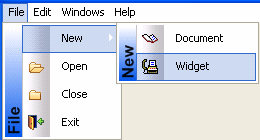
Menus with a contemporary style have a three-dimensional menu
appearance and can include bitmap and menu title bands. The following
figure shows a contemporary style menu:
After you select the contemporary style, you can modify other
menu style properties on the top-level menu object and on all
lower-level menu items. Since it is important to maintain a consistent
look across each menu and toolbar, very few style properties are
modifiable at the menu item level.
If you select the traditional menu style
If you select traditionalmenu! for the top-level menu object,
you cannot modify any of the menu style properties.
You can modify menu style properties only at design time. After
you select the contemporary menu style for a top-level menu object,
you can select values for other style properties to manipulate a
menu’s visual appearance. The following properties are modifiable for
the top-level menu object only; you cannot modify them for individual
menu items:
|
Property |
Datatype |
Use to assign |
|---|---|---|
|
MenuStyle |
Enumerated |
Overall menu style. Values are: contemporarymenu! |
|
MenuTextColor |
Long |
Menu text color. (Default is the Windows menu |
|
MenuBackColor |
Long |
Background color of the menu. |
|
MenuHighlightColor |
Long |
Menu highlight color. (Default is the default |
|
FaceName |
String |
Font face name. |
|
TextSize |
Integer |
Font character size in points for menu items. |
|
Bold |
Boolean |
Bold font. |
|
Italic |
Boolean |
Italic font. |
|
Underline |
Boolean |
Underline font. |
|
TitleBackColor |
Long |
Background color of the title |
|
BitmapBackColor |
Long |
Background color of the bitmap band of the menu. |
|
MenuBitmaps |
Boolean |
Bitmap band for the menu. |
|
BitmapGradient |
Boolean |
Background of the bitmap band to a gradient |
|
MenuTitles |
Boolean |
Menu title band. |
|
TitleGradient |
Boolean |
Background gradient style for the title |