Setting detail band properties
You can specify an icon for the rows in the detail band by
clicking the detail band in the DataWindow painter to display the
Properties view.
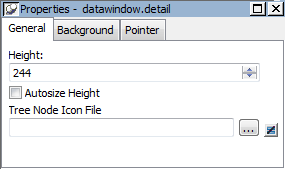
If you want to hide tree nodes in the detail band, set the
Height property to 0. The only property that is specific to the
TreeView DataWindow is located at the bottom of the Properties
view:
|
Property |
Description |
|---|---|
|
Tree Node Icon File |
The file name of the tree node icon in the detail |
For more information
For reference information about TreeView DataWindow properties,
methods and events, see DataWindow Reference.
Document get from Powerbuilder help
Thank you for watching.
Subscribe
Login
0 Comments
Oldest