Server support
PowerBuilder developers can build clients that invoke the services
of COM+ and third-party application servers, and build components (or
objects) that execute business logic inside each of these servers.
J2EE servers
J2EE, the Java 2 Platform, Enterprise Edition, is the official Java
framework for enterprise application development. A J2EE application is
composed of separate components that are installed on different computers
in a multitiered system. The following figure shows three tiers in this
system: the client tier, middle tier, and Enterprise Information Systems
(EIS) tier. The middle tier is sometimes considered to be made up of two
separate tiers: the Web tier and the business tier.
Figure: J2EE client, middle, and EIS tiers
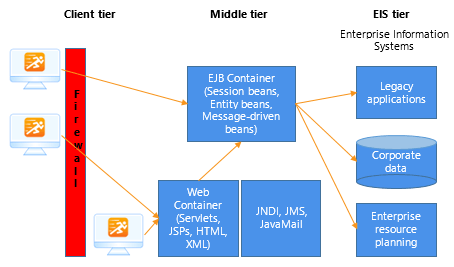
Client components, such as application clients and applets, run on
computers in the client tier. Web components, such as Java servlets and
JavaServer Pages (JSP) components, run on J2EE servers in the Web tier.
The EIS tier is made up of servers running relational database management
systems, enterprise resource planning applications, mainframe transaction
processing, and other legacy information systems.
COM+
A PowerBuilder application can act as a client to a COM server. The
server can be built using any COM-compliant application development tool
and it can run locally, on a remote computer as an in-process server, or
in COM+.
For more information, see Building a COM or COM+
Client