Selecting a table
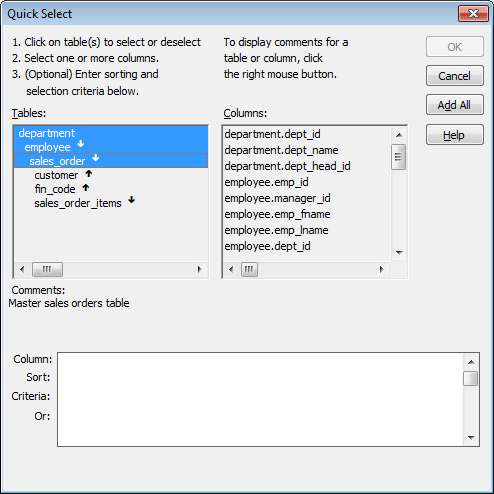
When you choose Quick Select, the Quick Select dialog box
displays. The Tables box lists tables and views in the current
database.
Displaying table comments
To display a comment about a table, position the pointer on
the table and click the right mouse button or select the
table.
Which tables and views
display?
The DBMS determines what tables and views display. For some
DBMSs, all tables and views display, whether or not you have
authorization. If you select a table or view you are not authorized to
access, the DBMS issues a message.
For ODBC databases, the tables and views that display depend on
the driver for the data source. SQL Anywhere does not restrict the
display, so all tables and views display, whether or not you have
authorization.
Tables with key
relationships
When you select a table, the table’s column names display in the
Columns box, and any tables having a key relationship with the
selected table display in the Tables box. These tables are indented
and marked with an arrow to show their relationship to the selected
table. You can select any of these related tables if you want to
include columns from them in the DataWindow object.
Meaning of the up and down
arrows
An arrow displays next to a table to indicate its relationship
to the selected table. The arrow always points in the many direction
of the relationship—toward the selected table (up) if the selected
table contains a foreign key in the relationship and away from the
selected table (down) if the selected table contains a primary key in
the relationship:
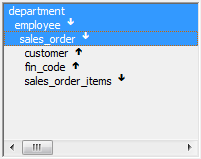
In this preceding illustration, the selected table is
sales_order. The Up arrows indicate that a foreign key in the
sales_order table is mapped to the primary key in the customer and
fin_code tables. The Down arrow indicates that the sales_order_items
table contains a foreign key mapped to the primary key in the
sales_order table.
How columns from additional tables
display
The column names of selected tables display in the Columns box.
If you select more than one table, the column names are identified
as:
|
1 |
tablename.columnname |
For example, department.dept_name and employee.emp_id display
when the Employee table and the Department table are selected.
To return to the original table list
Click the table you first selected at the top of the table
list.