Required runtime files
You will need to package and distribute the runtime files with the
application according to the database.
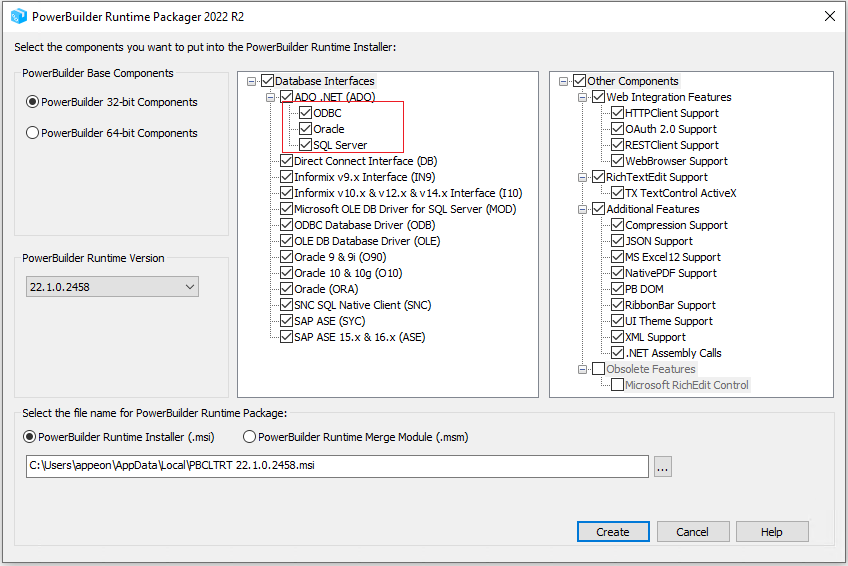
If you use the Runtime Packager to package the application runtime
files, you can select the database type so that the packager can
automatically package the required files.
Note
For application runtime, .NET Desktop
Runtime 6.0 must be installed to support the database
connection with ADO.NET.
You will need to manually package and distribute .NET Desktop Runtime 6.0 as the runtime packager
will not package these files.
If you manually package the PowerBuilder runtime files, please go to
the PowerBuilder Runtime location and get the files according to the
following table, as well as the .NET Desktop Runtime
6.0.
|
Database type |
Dependency files |
|---|---|
|
ORACLE |
pbDBDriver.dll Appeon.DB.Proxy.dll Appeon.DB.Proxy.runtimeconfig.json Appeon.DB.Proxy.deps.json Appeon.DB.Base.dll Appeon.DB.Base.deps.json Appeon.DB.Oracle.dll Appeon.DB.Oracle.deps.json Microsoft.Win32.SystemEvents.dll System.Configuration.ConfigurationManager.dll System.Diagnostics.PerformanceCounter.dll System.DirectoryServices.dll System.DirectoryServices.Protocols.dll System.Security.Cryptography.ProtectedData.dll System.Security.Permissions.dll System.Windows.Extensions.dll Oracle.ManagedDataAccess.dll |
|
SQL Server |
pbDBDriver.dll Appeon.DB.Proxy.dll Appeon.DB.Proxy.runtimeconfig.json Appeon.DB.Proxy.deps.json Appeon.DB.Base.dll Appeon.DB.Base.deps.json Appeon.DB.SQLServer.dll Appeon.DB.SQLServer.deps.json Microsoft.Data.SqlClient.dll Microsoft.Data.SqlClient.SNI.dll Microsoft.Identity.Client.dll Microsoft.SqlServer.Server.dll System.Configuration.ConfigurationManager.dll System.Security.Permissions.dll Azure.Core.dll Azure.Identity.dll Microsoft.Bcl.AsyncInterfaces.dll Microsoft.Identity.Client.Extensions.Msal.dll Microsoft.IdentityModel.Abstractions.dll Microsoft.IdentityModel.JsonWebTokens.dll Microsoft.IdentityModel.Logging.dll Microsoft.IdentityModel.Protocols.dll Microsoft.IdentityModel.Protocols.OpenIdConnect.dll Microsoft.IdentityModel.Tokens.dll Microsoft.Win32.SystemEvents.dll System.Drawing.Common.dll System.IdentityModel.Tokens.Jwt.dll System.Memory.Data.dll System.Runtime.Caching.dll System.Security.Cryptography.ProtectedData.dll System.Windows.Extensions.dll |
|
ODBC |
pbDBDriver.dll Appeon.DB.Proxy.dll Appeon.DB.Proxy.runtimeconfig.json Appeon.DB.Proxy.deps.json Appeon.DB.Base.dll Appeon.DB.Base.deps.json Appeon.DB.Odbc.dll Appeon.DB.Odbc.deps.json System.Data.Odbc.dll |