Related topics
CacheName (read more)
Besides mapping the transaction object with the cache through the
IDE or PowerServer, you can also map the transaction object with the
cache through the application scripts (using the DBParm CacheName
property, as shown below).
|
1 |
SQLCA.DBParm="cachename='sales'" |

CacheGroup (read more)
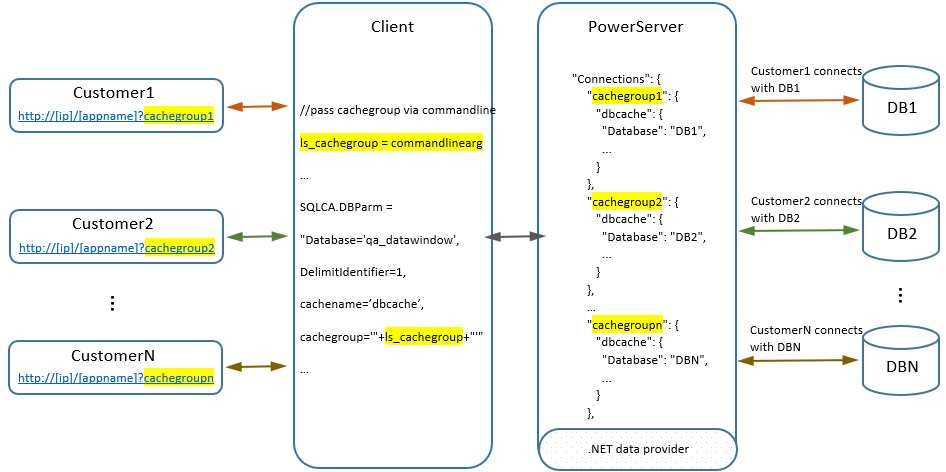
You can also define multiple cache groups (each group contains one
or more caches) in PowerServer. With cache groups, one application can
support different database scenarios while no code change is
needed.
|
1 |
SQLCA.DBParm = "Database='qa_datawindow',DelimitIdentifier=1,cachename='dbcache',cachegroup='"+ls_cachegroup+"'" |
LogID and LogPass (read more)
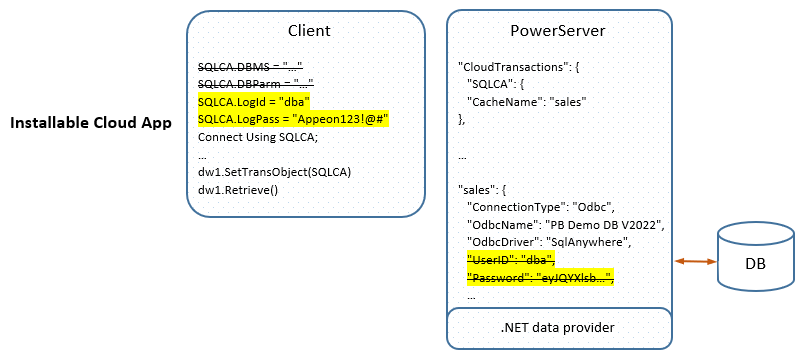
You can also use the LogID and LogPass property values of the
Transaction object to log in to the database server (instead of using
user name and password in the cache). This makes the installable cloud
app to be able to connect to the database based on the user credentials
provided at runtime.
Applications.json
The Applications.json file is
generated under the compiled Web API > AppConfig folder (or in the solution >
UserExtensions project > AppConfig folder).
It contains the following settings of each deployed
application:
You can directly modify this file in the Web APIs and then restart
Web APIs for the changes to take effect.
|
1 2 3 4 5 6 7 8 9 10 11 12 13 14 15 16 17 18 19 20 21 22 23 24 25 26 27 28 29 30 31 32 33 34 35 36 37 38 |
{ "Applications": { "salesdemo_cloud": { "CloudTransactions": { "sqlca": { "CacheName": "sales" } }, "Transaction": { "Timeout": 120, "TransactionException": true }, "Session": { "Timeout": 3600 }, "Request": { "Timeout": 3600 }, "RunMode": 0, "MaxSPCache": 50 } }, "Connections": { "Default": { "sales": { "ConnectionType": "Odbc", "OdbcName": "PB Demo DB V2022R2", "OdbcDriver": "SqlAnywhere", "UserID": "dba", "Password": "eyJQY...", "CommandTimeout": 30, "SecurityOptions": null, "OtherOptions": null, "DynamicConnection": false } } } } |