Profiling Trace View
The Trace view uses a TreeView control to display the events and
functions in the trace file. The initial display shows top-level
routines. Each node expands to show the sequence of routine execution.
The fully expanded TreeView shows the complete sequence of executed
instructions for the trace file.
The Trace view uses the trace tree model to show the sequence of
execution. It includes statistics and (for those routines that
originated in PowerScript source) source code.
You can use the Trace View Options section of the Preferences
dialog box to control the display:
-
System routines
This option controls whether the Trace view includes
information for lines that execute PowerBuilder system
routines. -
Line information
This option controls whether the Trace view includes line
numbers.
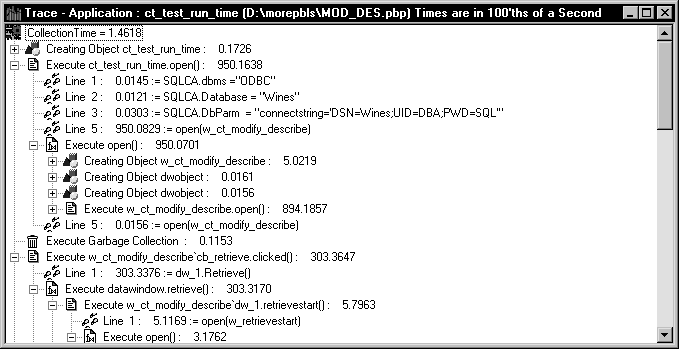
The following screen shows a Trace view with several nodes
expanded. The number to the right of each item is the execution time
for that item.
Trace view metrics
The Trace view displays two metrics. The profiling tool accesses
these metrics from instances of the TraceTree and TraceTreeNode
objects.
|
Entry |
What it means |
|---|---|
|
Routine or line number |
The routine or line number that was |
|
Execution time |
Total execution time for the Tree view entry. |
About preferences
The specifications you make in the Preferences dialog box
control whether the Trace view displays system functions and line
numbers.