PB odbc connecting to mssql maps date and datetime2 to
char(10)
Symptom
Using ODBC to connect to mssql (sqlsrv32.dll) and then creating a
DataWindow, PowerBuilder will map the date and datetime2 datatypes to
char(10) in the DataWindow painter.
Environment
PowerBuilder
Microsoft SQL Server 2012
Reproducing the Issue
1. Create a new ODBC datasource using the sqlsrv32.dll to connect
to MSSQL Server 2012.
2. In PowerBuilder, connect to that new ODBC datasource.
3. In the database painter, create a new table with the following
columns:
mycol1 int
mycol2 date
mycol3 datetime
mycol4 smalldatetime
mycol5 datetime2
4. Create a new tabular DataWindow using the table that you just
created.
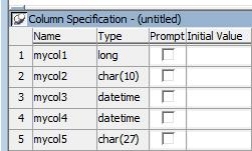
5. In the column specification view, notice that mycol2 is mapped
to char(10) and mycol5 is mapped to char(27).
Cause
Issue with the third party driver.
Solution
The workaround is to use the Microsoft SQL Native Client ODBC
(SQLNCLI10.dll) driver instead of the MS SQLServer ODBC (SQLSRV32.dll)
driver.