Oracle Library OCI.DLL could not be loaded
Symptom
Get the following error message when trying to connect to an
Oracle database from PowerBuilder:
|
1 |
'Oracle Library OCI.DLL could not be loaded' |
Environment
PowerBuilder
Windows 10 64-bit
Reproducing the Issue
Trying to connect to Oracle from PowerBuilder with the 64-bit
Oracle client will cause this error.
Cause
PowerBuilder is a 32-bit application and therefore, can only
connect to 32-bit database clients.
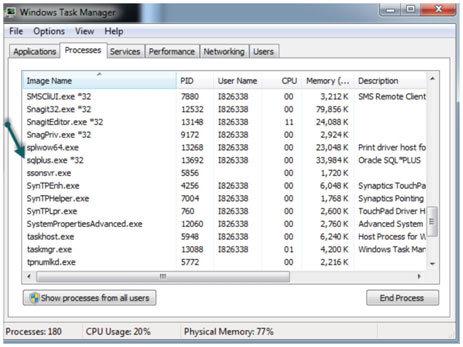
To verify whether or not the 32-bit Oracle client is being used
run the Oracle SQLPlus program. Then open the Windows Task Manager and
go to the Processes tab. Sort it by process name and look for
sqlplus.exe. It will look like the following if it is running as a
32-bit application:
sqlplus.exe *32
Solution
Install the 32-bit Oracle client to resolve this issue.