Opening streams
Streams contain the raw data of an OLE object. You would not want
to alter a stream created by a server application. However, you can add
your own streams to storage files. These streams can store information
about the storages. You can write streams that provide labels for each
storage or write a stream that lists the members of the storage.
To access a stream in an OLE storage file, you define a stream
variable and instantiate it. Then you open a stream from a storage that
has already been opened. Opening a stream establishes a connection
between the stream variable and the stream data within a storage.
The following code declares and creates OLEStorage and OLEStream
variables, opens the storage, and then opens the stream:
|
1 2 3 4 5 6 7 8 9 10 11 12 13 14 15 16 17 18 19 |
integer result OLEStorage stg_pic OLEStream stm_pic_label /*************************************************** Allocate memory for the storage and stream variables ***************************************************/ stg_pic = CREATE OLEStorage stm_pic_label = CREATE OLEStream /*************************************************** Open the storage and check the return value ***************************************************/ result = stg_prod_pic.Open("picfile.ole") IF result <> 0 THEN RETURN /*************************************************** Open the stream and check the return value ***************************************************/ result = stm_pic_label.Open(stg_prod_pic, & "pic_label", stgReadWrite!) IF result <> 0 THEN RETURN |
PowerBuilder has several stream functions for opening and closing
a stream and for reading and writing information to and from the
stream.
|
Function |
Result |
|---|---|
|
Open |
Opens a stream into the specified OLEStream |
|
Length |
Obtains the length of the stream in |
|
Seek |
Positions the read/write pointer within the stream. |
|
Read |
Reads data from the stream beginning at the |
|
Write |
Writes data to the stream beginning at the If the pointer is not at the |
|
Close |
Closes the stream, breaking the connection between |
Example: writing and reading
streams
This example displays a picture of a product in the OLE control
ole_product when the DataWindow object dw_product displays that
product’s inventory data. It uses the file constructed with the utility
application described in the earlier example (see Example: building a
storage). The pictures are stored in an OLE storage file, and the
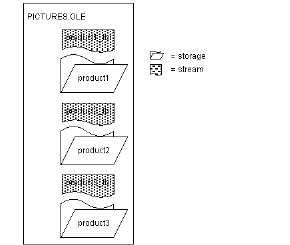
name of each picture’s storage is also the product identifier in a
database table. This example adds label information for each picture,
stored in streams whose names are the product ID plus the suffix
_lbl.
The following figure shows the structure of the file.
Figure: OLE storage file structure
The example has three scripts:
-
The window’s Open event script opens the storage file and
retrieves data for the DataWindow object. (Note that the
application’s Open event connects to the database.) -
The RowFocusChanged event of the DataWindow object displays
the picture. It also opens a stream with a label for the picture and
displays that label in a StaticText. The name of the stream is the
product identifier plus the suffix _lbl.If the label is empty (its length is zero), the script writes
a label. To keep things simple, the data being written is the same
as the stream name. (Of course, you would probably write the labels
when you build the file and read them when you display it. For the
sake of illustration, reading and writing the stream are both shown
here.) -
The window’s Close event script saves the storage file and
destroys the variable.
The OLEStorage variable stg_prod_pic is an instance variable of
the window:
|
1 |
OLEStorage stg_prod_pic |
The script for the window’s Open event is:
|
1 2 3 |
integer result stg_prod_pic = CREATE OLEStorage result = stg_prod_pic.Open( is_ole_file) |
The script for the RowFocusChanged event of dw_prod is:
|
1 2 3 4 5 6 7 8 9 10 11 12 13 14 15 16 17 18 19 20 21 22 23 24 25 26 27 28 29 30 31 32 33 34 35 36 37 38 39 40 41 42 43 44 45 46 47 48 |
integer result string prodid, labelid, ls_data long ll_stmlength OLEStream stm_pic_label /*************************************************** Create the OLEStream variable. ***************************************************/ stm_pic_label = CREATE OLEStream /*************************************************** Get the product id from the DataWindow. ***************************************************/ this.Object.prod_id[currentrow] /*************************************************** Open the picture in the storage file into the control. The name of the storage is the product id. ***************************************************/ result = ole_prod.Open(stg_prod_pic, prodid) IF result <> 0 THEN RETURN /*************************************************** Construct the name of the product label stream and open the stream. ***************************************************/ labelid = prodid + "_lbl" result = stm_pic_label.Open( stg_prod_pic, & labelid, stgReadWrite! ) IF result <> 0 THEN RETURN /*************************************************** Get the length of the stream. If there is data (length > 0), read it. If not, write a label. ***************************************************/ result = stm_pic_label.Length(ll_stmlength) IF ll_stmlength > 0 THEN result = stm_pic_label.Read(ls_data) IF result <> 0 THEN RETURN // Display the stream data in st_label st_label.Text = ls_data ELSE result = stm_pic_label.Write( labelid ) IF result < 0 THEN RETURN // Display the written data in st_label st_label.Text = labelid END IF /**************************************************** Close the stream and release the variable's memory. ***************************************************/ result = stm_pic_label.Close() DESTROY stm_pic_label |
The script for the window’s Close event is:
|
1 2 3 |
integer result result = stg_prod_pic.Save() DESTROY stg_prod_pic |