Opening and saving files: an example
This example consists of several scripts that handle opening and
saving files. Users can open existing files and save changes. They can
also save the contents to another file. If users save the file they
opened, saving proceeds without interrupting the user. If users save
to a file name that exists, but is not the file they opened, they are
asked whether to overwrite the file:
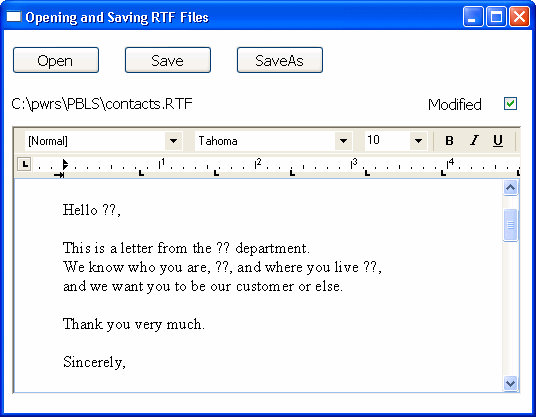
The example includes instance variable declarations, scripts,
functions, and events.
Instance variable
declarations
ib_saveas
A flag for the FileExists event. When FALSE, the user is saving
to the file that was opened, so overwriting is expected:
|
1 |
boolean ib_saveas=FALSE |
is_filename
The current file name for the contents, initially set to
“Untitled”:
|
1 |
string is_filename |
Open Document script
This script opens a file chosen by the user. Since opening a
file triggers the Modified event and sets the Modified property, the
script resets Modified to FALSE. The Checked property of the Modified
check box is set to FALSE too:
|
1 2 3 4 5 6 7 8 9 10 11 12 13 14 15 16 17 18 19 20 21 22 23 24 25 26 27 |
integer li_answer, li_result string ls_name, ls_path li_answer = GetFileOpenName("Open File", ls_path, & ls_name, "rtf", & "Rich Text(*.RTF),*.RTF, Text files(*.TXT),*.TXT") IF li_answer = 1 THEN // User did not cancel li_result = rte_1.InsertDocument(ls_path, TRUE) IF li_result = 1 THEN // Document open successful // Save and display file name is_filename = ls_path st_filename.Text = is_filename // Save and display modified status rte_1.Modified = FALSE cbx_modified.Checked = rte_1.Modified ELSE MessageBox("Error", "File not opened.") END IF END IF RETURN 0 |
Scripts that save the
document
The user might choose to save the document to the same name or
to a new name. These scripts could be assigned to menu items as well
as buttons. The Save button script checks whether the instance
variable is_filename holds a valid name. If so, it passes that file
name to the of_save function. If not, it triggers the SaveAs button’s
script instead:
|
1 2 3 4 5 6 7 8 9 10 11 |
integer li_result string ls_name // If not associated with file, get file name IF is_filename = "Untitled" THEN cb_saveas.EVENT Clicked() ELSE li_result = Parent.of_save(is_filename) END IF RETURN 0 |
The SaveAs script sets the instance variable ib_saveas so that
the FileExists event, if triggered, knows to ask about overwriting the
file. It calls of_getfilename to prompt for a file name before passing
that file name to the of_save function.
|
1 2 3 4 5 6 7 8 9 10 11 12 13 |
integer li_result string ls_name ib_saveas = TRUE ls_name = Parent.of_getfilename() // If the user canceled or an error occurred, abort IF ls_name = "" THEN RETURN -1 li_result = Parent.of_save(ls_name) ib_saveas = FALSE RETURN 0 |
Functions for saving and getting a file
name
of_save function
This function accepts a file name argument and saves the
document. It updates the file name instance variable with the new name
and sets the check box to correspond with the Modified property, which
is automatically set to FALSE after you call SaveDocument
successfully:
|
1 2 3 4 5 6 7 8 9 10 11 12 13 14 15 16 17 18 |
integer li_result MessageBox("File name", as_name) // Don't need a file type because the extension // will trigger the correct type of save li_result = rte_1.SaveDocument(as_name) IF li_result = -1 THEN MessageBox("Warning", "File not saved.") RETURN -1 ELSE // File saved successfully is_filename = as_name st_filename.Text = is_filename cbx_modified.Checked = rte_1.Modified RETURN 1 END IF |
of_getfilename function
The function prompts the user for a name and returns the file
name the user selects. It is called when a file name has not yet been
specified or when the user chooses Save As. It returns a file
name:
|
1 2 3 4 5 6 7 8 9 10 11 12 13 |
integer li_answer string ls_name, ls_path li_answer = GetFileSaveName("Document Name", ls_path, & ls_name, "rtf", & "Rich Text(*.RTF),*.RTF,Text files(*.TXT),*.TXT") IF li_answer = 1 THEN // Return specified file name RETURN ls_path ELSE RETURN "" END IF |
Events for saving and
closing
FileExists event
When the user has selected a file name and the file already
exists, this script warns the user and allows the save to be canceled.
The event occurs when SaveDocument tries to save a file and it already
exists. The script checks whether ib_saveas is TRUE and, if so, asks
if the user wants to proceed with overwriting the existing
file:
|
1 2 3 4 5 6 7 8 9 10 11 12 |
integer li_answer // If user asked to Save to same file, // don't prompt for overwriting IF ib_saveas = FALSE THEN RETURN 0 li_answer = MessageBox("FileExists", & filename + " already exists. Overwrite?", & Exclamation!, YesNo!) // Returning a non-zero value cancels save IF li_answer = 2 THEN RETURN 1 |
Modified event
This script sets a check box so the user can see that changes
have not been saved. The Modified property is set automatically when
the event occurs. The event is triggered when the first change is made
to the contents of the control:
|
1 |
cbx_modified.Checked = TRUE |
CloseQuery event
This script for the window’s CloseQuery event checks whether the
control has unsaved changes and asks whether to save the document
before the window closes:
|
1 2 3 4 5 6 7 8 9 10 11 12 13 14 15 |
integer li_answer // Are there unsaved changes? No, then return. IF rte_1.Modified = FALSE THEN RETURN 0 // Ask user whether to save li_answer = MessageBox("Document not saved", & "Do you want to save " + is_filename + "?", & Exclamation!, YesNo! ) IF li_answer = 1 THEN // User says save. Trigger Save button script. cb_save.EVENT Clicked() END IF RETURN 0 |