Opening a RichTextEdit control over terminal services is
slow
Phenomenon
Opening a window with the new RTE control over Terminal Services
is very slow.
Scenario 1
Published PowerBuilder RemoteApp over Terminal Services.
-
Allow client printer redirection.
-
Use the client default printing device.
-
Use the Remote Desktop Easy Print print driver first.
-
Open a PowerBuilder Application.
-
Open a window that has the new RTE control.
Scenario 2
Access a Remote Desktop that has the PowerBuilder Application
installed.
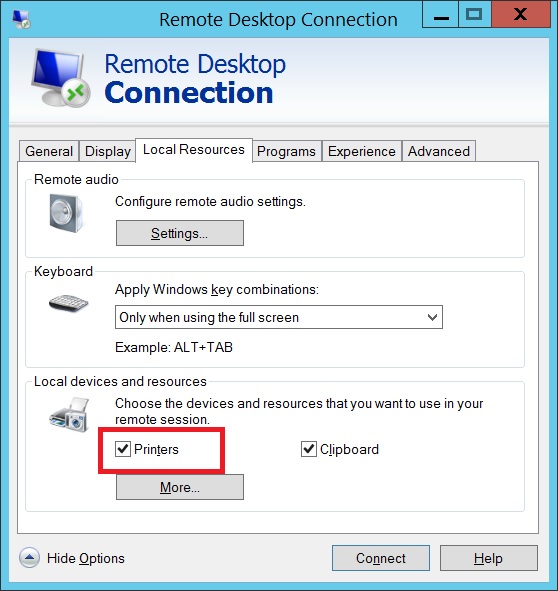
-
Open Remote Desktop.
-
Open a PowerBuilder Application.
-
Open a window that has the new RTE control.
Workaround 1
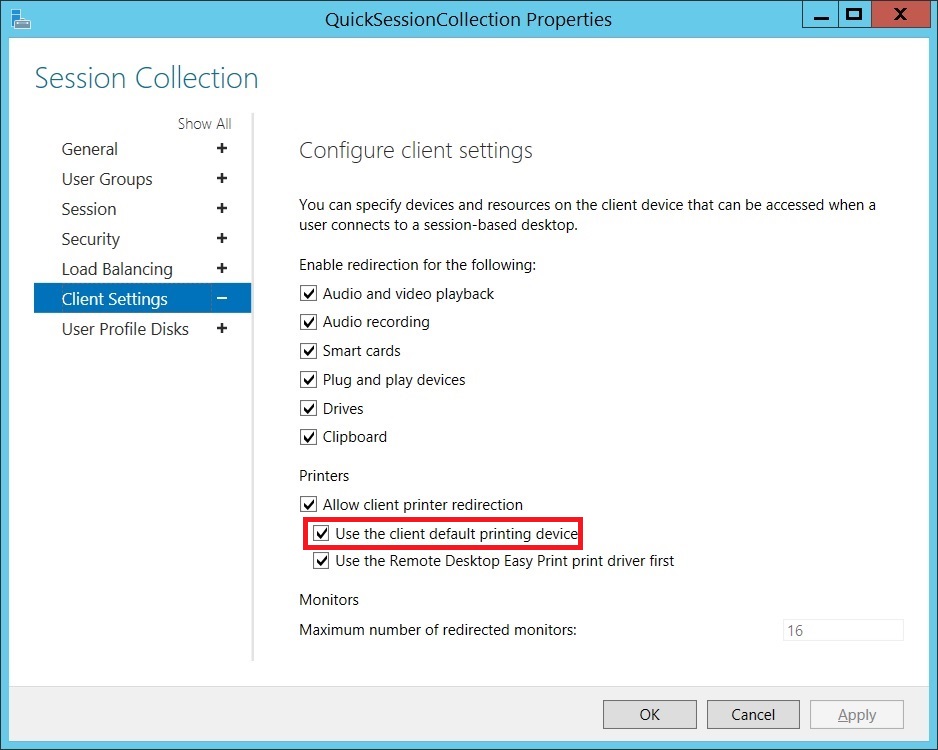
-
Open Server Manager.
-
Select “Remote Desktop Services”.
-
Select the Collection where your application has been
published. -
On the “Properties” section, Click on the “Tasks”
dropdown. -
Choose “Edit Properties”.
-
Expand the “Client Settings”.
-
De-select the checkbox for “Use the client default printing
device” option.
Workaround 2
On the PowerBuilder application:
-
Delete the RichTextEdit Control from the window.
-
Add Functions:
Global External Functions
12FUNCTION ULong GetDefaultPrinterW(REF String pszBuffer, REF ULong pcchBuffer) LIBRARY "winspool.drv" ALIAS FOR "GetDefaultPrinterW"FUNCTION ULong SetDefaultPrinterW(String pszPrinter) LIBRARY "winspool.drv" ALIAS FOR "SetDefaultPrinterW" -
Add Instance Variables:
Instance Variables
123STRING is_fullstring, is_defaultSTRING is_name, is_driver, is_port, is_temp, is_newLONG il_place -
Add code to the Open event of your window:
Open Event
12345678//Maximize the WindowWindowState = Maximized!//Trigger the PreOpen EventTriggerEvent("ue_preopen")//Trigger the PostOpen EventPostEvent("ue_postopen") -
Add code to the PreOpen User Event:
ue_PreOpen
123456789101112131415161718192021222324252627282930//Variable DeclarationSTRING ls_nullULONG lul_buffer//Get the Current Printer infois_fullstring = PrintGetPrinter()il_place = POS(is_fullstring, "~t")is_name = LEFT(is_fullstring, il_place - 1)is_temp = MID(is_fullstring, il_place + 1)il_place = POS(is_temp, "~t")is_driver = LEFT(is_temp, il_place - 1)is_port = MID(is_temp, il_place + 1)//Clear buffersSetNull(ls_null)lul_buffer = 0GetDefaultPrinterW(ls_null, lul_buffer)is_default = SPACE(lul_buffer)//Get OS default PrinterGetDefaultPrinterW(is_default, lul_buffer)//Check if the current printer has been redirectedIF POS(is_name, "redirected") > 0 THEN//Set OS default PrinterSetDefaultPrinterW("Microsoft XPS Document Writer")//Change the PrinterPrintSetPrinter("Microsoft XPS Document Writer")END IF -
Add code to the PostOpen User Event:
ue_PostOpen
1234567891011121314151617181920212223//Variable DeclarationRichTextEdit rte_control//Create the Objectrte_control = CREATE RichTextEdit//Set the X, Y, Width and Height properties of the Objectrte_control.x = 46rte_control.y = 100rte_control.Width = 1678rte_control.Height = 1116//Open the User ObjectOpenUserObjectWithParm(rte_control, "", 46, 100)//Bring the RTE to the Toprte_control.BringToTop = TRUE//Set the OS Default PrinterSetDefaultPrinterW(is_default)//Set the Previous PrinterPrintSetPrinter(is_name)
This allows the window to open and creates the RTE Control after
finishing opening the window.