OAuth Grant Types
Contents
PowerBuilder supports getting secured data from the OAuth 2.0
authorization server. The Bearer access token is supported, and the
following grant types are supported:
-
Authorization Code
-
Implicit Flow
-
Client Credentials
-
Extension (or Refresh Token)
-
Resource Owner Password
Authorization Code and Implicit Flow can be implemented using the
WebBrowser control and the OAuthClient object. The WebBrowser control
gets the authorization code. The OAuthClient object obtains the access
token and protected resources.
Client Credentials, Extension, and Resource Owner Password can be
implemented using the OAuthClient object (including TokenRequest,
TokenResponse, OAuthRequest, and ResourceResponse). The OAuthClient
object obtains the access token and protected resources. The
TokenRequest and TokenResponse objects get or set the access token
request and response. The OAuthRequest and ResourceResponse objects get
or set the protected resource request and response.
PowerBuilder supports the Basic HTTP authentication theme (see
Example 2 (using
HTTPClient)), and does not support the following HTTP
authentication themes: Digest, NTLM, Passport, and Negotiate.
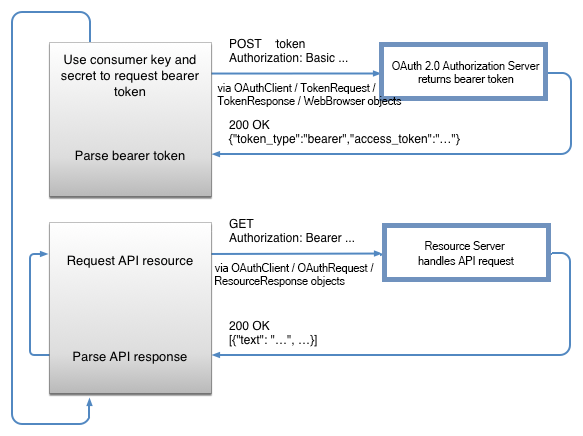
As shown in the following figure, to access data from the OAuth
2.0 authorization server, there are mainly two steps:
-
Use the HTTP Post method to request the access token from the
authorization server; -
Set the access token in the HTTP Authorization header, and use
Get method to request the data from the resource server.
This section provides code examples to demonstrate how to get data
using different grant type.
And the examples will use the following server settings and
parameters.
| For requesting access token |
|||||
|---|---|---|---|---|---|
|
Token URL and settings |
TokenLocation=”https://xxx.xxx.xxx/oauth2/token” ClientID=”367c4163ddc1427d96655cd220c6714b” Secret=”4079f8749939446cbc81fd0c27709187″ |
||||
|
Parameters |
Authorization Server
|
Implicit Flow:
|
Client Credentials
|
Extension
|
Resource Owner Password
|
|
Format |
JSON |
||||
|
Required Authentication |
Yes (“Basic Note: The WebBrowser control does not support |
||||
|
Successful Responses: |
Return the following value 200 OK {“access_token”: |
||||
| For requesting resource |
|||
|---|---|---|---|
|
Resource URL |
https://xxx.xxx.xxx/order/getall |
||
|
Format |
JSON |
||
|
Required Authentication |
Yes (“Bearer |
||
|
Successful Responses: |
Return the following value 200 OK [{“person_Title”: |
||