Network requirements
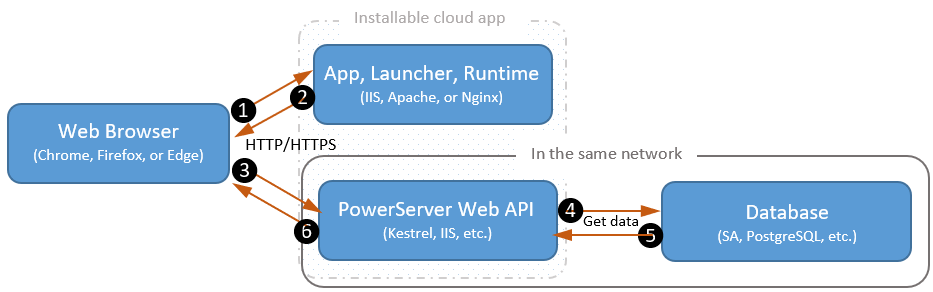
It is strongly recommended that the installable cloud app (more
specifically, the PowerServer Web APIs) should be published to a server
that locates on the same LAN as the database server. If the database is
not on the same network as the PowerServer Web APIs, every request has to
go a long way from PowerServer to the database, it is very likely that
there will be performance and security issues.
Installable cloud apps make HTTP requests to the server to download
the app files and necessary runtime files and make HTTP requests to
PowerServer Web APIs to request services and transfer data. It is required
that you enable TLS 1.2/TLS 1.3 for the file transfer between the client
and the file server, and also enable TLS 1.2/TLS 1.3 for the REST
communications between the client and PowerServer.