MonthCalendar
A MonthCalendar control lets you display a calendar to your
users to make it easy for them to view and set date information. You
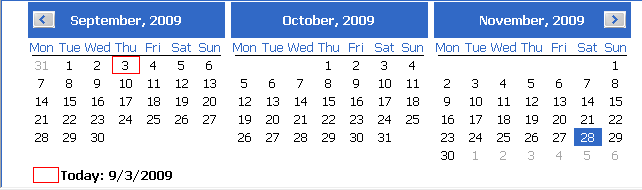
can size the calendar to show from one to twelve months. The following
illustration shows a calendar with three months. Today’s date is
September 3, 2009, and the date November 28 has been selected.
If a user selects a date or a range of dates in the calendar,
you can use the GetSelectedDate or GetSelectedRange functions to
obtain them. You use the SetSelectedDate and SetSelectedRange
functions to select dates programmatically.
You can also:
-
Set and get minimum and maximum dates that can be displayed
in the calendar -
Display dates in bold
-
Get the number of months currently displayed with the start
and end dates -
Set and get the date the calendar uses as the current
date -
Use properties to customize the appearance of the
calendar
Users can navigate through the calendar using the arrow keys in
the top corners. You can specify how many months should scroll for
each click using the ScrollRate property. If users click on the name
of the month in the title bar, a drop-down list displays, allowing
them to navigate to another month in the same year. Clicking on the
year in the title bar displays a spin control that lets users navigate
quickly to a different year.