Menu painter views
You use two views to specify menu items that display in the menu
bar and under menu bar items:
|
This view |
Displays |
|---|---|
|
Tree Menu view |
All the menu items at the same time when the tree |
|
WYSIWYG Menu view |
The menu as you will see it and use it in your |
The Tree Menu view and the WYSIWYG Menu view are equivalent. You
can use either view to insert new menu items on the menu bar or on
drop-down or cascading menus, or to modify existing menu items. The
menus in both views change when you make a change in either
view.
You specify menu properties in two views:
|
This view |
Displays |
|---|---|
|
Properties view (for the top-level menu |
General and Appearance tab pages for setting |
|
Properties view (for submenu |
General and Toolbar tab pages for setting |
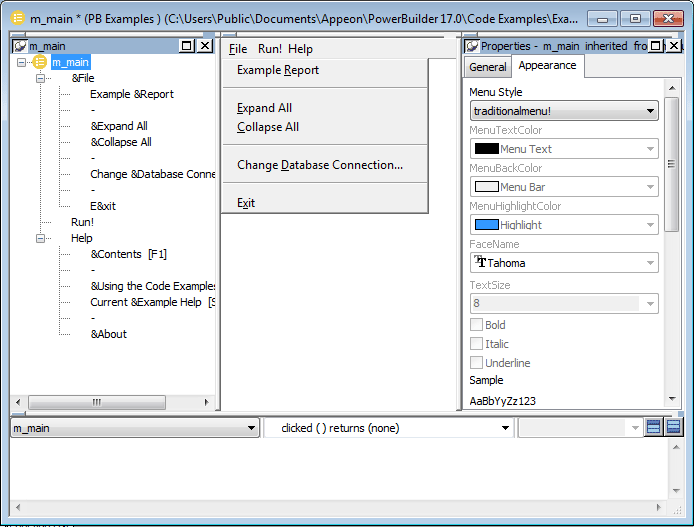
Views for the top level menu
object
This Menu painter layout is for the top level menu object,
m_main. The Tree Menu view is in the top left and the WYSIWYG Menu
view is in the top middle. The General and Appearance tab pages
display in the Properties view on the right. For more information
about these properties, see Setting menu style
properties for contemporary menus.
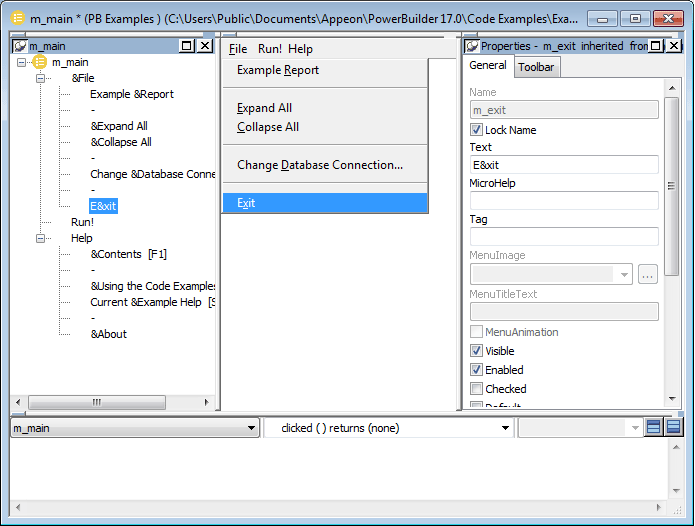
Views for submenu items
This Menu painter layout is for a menu item under the top level,
in this case the Exit menu item. The Tree Menu view is in the top left
and the WYSIWYG Menu view is in the top middle. The General and
Toolbar tab pages display in the Properties view on the right. For
more information about these properties, see Setting General properties for menu
items.