LoadWithDotNetFramework
PowerScript function
Description
Loads a .NET framework assembly.
Applies to
DotNetAssembly objects
Syntax
|
1 |
objectname.LoadWithDotNetFramework ( readonly string assemblypath {, boolean customappdomain }) |
|
Argument |
Description |
|---|---|
|
objectname |
The name of the DotNetAssembly object. |
|
assemblypath |
The name and location of the .NET assembly (*.dll). The location can be an absolute path or a relative path. |
|
customappdomain (optional) |
Boolean whether to create a new appdomain to load the True — to create a new appdomain to load the False — (default) to use the default appdomain to load For the custom appdomain parameter, you can learn more at |
Return value
Integer.
Returns values as follows. If any argument’s value is null, the
method returns null.
1 — Success.
-1 — Unknown error.
-2 — Could not find the assembly.
-3 — It’s not a valid assembly.
-4 — The assembly requires a dependent assembly.
Usage
The .NET DLL file supported by PowerBuilder must be either a .NET
Framework class library or a .NET Standard class library.
The DLL file will require the corresponding version of .NET
Framework installed, especially if the DLL file is a .NET Standard class
library. Please check the Microsoft website or the following table for the
compatible versions between .NET Standard and .NET Framework.
| .NET Standard | 1.0 | 1.1 | 1.2 | 1.3 | 1.4 | 1.5 | 1.6 | 2.0 |
| .NET Framework | 4.5 | 4.5 | 4.5.1 | 4.6 | 4.6.1 | 4.7.2 | 4.7.2 | 4.7.2 |
If the DLL makes reference to another project, DLL, or Nuget
package, please copy them into the same location.
When the DLL failed to load and triggered an exception, the
exception message will be stored in the ErrorText property.
If you are prompted with missing dependent DLLs, even after you have
provided the required DLLs in the required location, you can exit
PowerBuilder IDE to release DLL and then try again, or you can set
customappdomain to true (to automatically release DLL when application
exits).
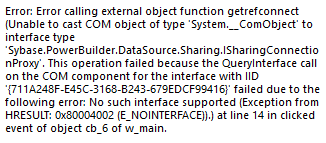
When customappdomain is true, and if the following errors occur with
the usage of oleobject(sqlca.getadoconnection()), you can set
customappdomain to false to avoid the error.
Examples
The following example loads a DLL in the relative path:
|
1 2 3 4 5 6 7 8 9 10 11 12 13 14 15 16 17 18 |
Long ll_return String ls_dll DotNetAssembly lcs_ass //Specifies a DLL in the relative path Ls_dll = "Appeon.Simple.dll" //Instantiates the DotNetAssembly object Lcs_ass = create DotNetAssembly //Loads the DLL Ll_return = lcs_ass.LoadWithDotNetFramework(ls_dll) //Checks the result If ll_return < 0 then Messagebox("Load "+ls_dll+" Failed", lcs_ass.ErrorText) Return ll_return End if |
See also