How to detect unsupported features
The PowerScript features will be analyzed during the build &
deploy process; and if any feature is detected to be unsupported by the
PowerServer Web APIs, it will be reported as an unsupported feature in the
Output window. Please note that not every unsupported feature can be
detected and listed, therefore, it is strongly recommended that you go
through the unsupported features/scenarios and discrepancies documented in
this guide and make sure they do not exist in your application.
The unsupported feature analysis option is disabled by default. To
enable this option, open the Application painter’s Properties view, and select the option “During
compilation, report unsupported PowerScript features for PowerServer
deployment” in the PowerServer tab
page.
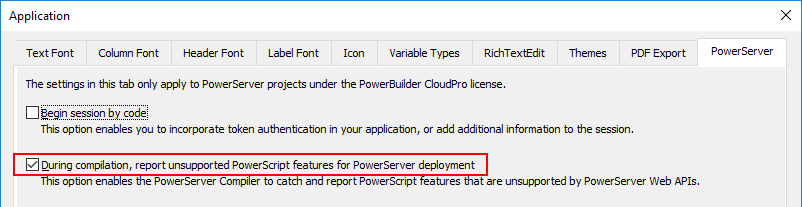
With this option selected, the scripts will be analyzed for
unsupported features
-
when the Build & Deploy PowerServer
Project option is selected.If any unsupported feature is detected, it will be displayed in
the Output window | Unsupported (DWs) tab or Unsupported (PowerServer)
tab.You can double-click the line or select Edit or Edit Source from
the pop-up menu to open the object in the painter or source
editor.

-
when the object is saved.
PowerBuilder compiles each time when PowerScript is saved and
displays the unsupported feature for PowerServer, regardless of the
project type.If any unsupported feature is detected, it will be displayed as
compilation warnings, as shown below.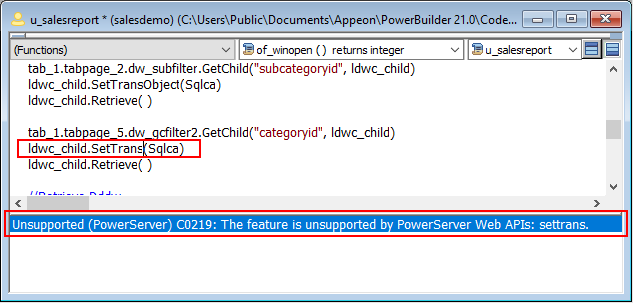
Make sure to modify the unsupported feature according to the
suggested workarounds in this guide. Even if there are no unsupported
features reported, it is still recommended that you go through the
following sections to find out what features/discrepancies cannot be
detected and why they are not working as expected in the installable cloud
app.
-
Unsupported features & workarounds
Unsupported
features that can be detected — lists the unsupported features
that can be detected by the
deployment tool and provides possible workarounds.Unsupported
features that cannot be detected — lists the unsupported
features that cannot be detected by
the deployment tool and provides possible workarounds. -
Discrepancies & workarounds
Discrepancies that
cannot be detected — lists the programming or behavior
differences between PowerBuilder and PowerServer that cannot be detected by the deployment tool and
provides possible workarounds.
Tips:
If you want the analysis tool to ignore a piece of code, you can
place the code within these labels:
#begin_disable_ufa and
#end_disable_ufa.
For example, the SetTrans function in the
following example will not be reported as an unsupported feature.
|
1 2 3 4 5 6 7 8 9 10 11 |
<span><strong>#begin_disable_ufa</strong></span> if ispowerserverapp () = true then dw_1.SetTransObject(sqlca) else dw_1.settrans(sqlca) end if <span><strong>#end_disable_ufa</strong></span> dw_1.retrieve() |