How to change the password of the ASE database when PowerBuilder
is running
Symptom
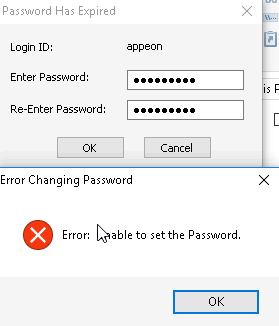
When the ASE database password expires, if the PWDialog parameter
is set in DBParm, a window will automatically pop up for users to change
the password when PowerBuilder runs and connects to the ASE
database.
|
1 |
SQLCA.DBParm = "PWEncrypt='Yes',PWDialog=1" |
But when users try to change the password, they get the following
error:
Environment
PowerBuilder 2017 or later
Cause
This is a known issue in PowerBuilder caused by SQLCA.DBMS=“ASE
Adaptive Server Enterprise”.
Solution
You can use the following DMS to connect to the ASE database
instead so that you can change the password directly on the pop-up
window.
|
1 |
SQLCA.DBMS = "SYC Adaptive Server Enterprise" |
After you change the password successfully, we recommend you use
this DBMS:
|
1 |
SQLCA.DBMS = "ASE Adaptive Server Enterprise" |
Document get from Powerbuilder help
Thank you for watching.
Subscribe
Login
0 Comments
Oldest