Getting the
signature of a function
To write the C++ code that invokes the f_mult function, you need
to obtain its method ID. The method ID is used to initialize the
PBCallInfo structure and to invoke the function. There are two
IPB_Session functions that return a method ID: GetMethodID, which takes
a signature, and FindMatchingFunction, which takes a comma-separated
list of arguments. You use the same functions when you call PowerScript
from the code in your extension; see Calling PowerScript from an
extension.
If you want to use GetMethodID, you need a signature. This
function is simple enough that you do not need a tool to obtain a
signature — the signature is the string III, which indicates that the
function returns an integer and takes two integers as arguments.
For more complicated functions, you can get the signature from the
System Tree or with the pbsig190 tool.
Getting a signature from the System
Tree
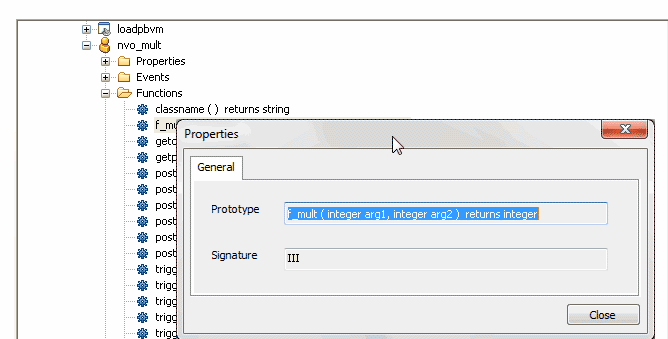
To get the signature of f_mult in the System Tree, expand
nvo_mult, right-click on the f_mult function, and select Properties from
the pop-up menu. The signature displays in the Properties dialog box in
the Signature text box:
Getting a signature using
pbsig190
To get the signature of f_mult with pbsig190, type the following
at a command prompt:
|
1 |
pbsig190 d:pblsloadpbvm.pbl |
In the output of pbsig190, the comment on the last line contains
the signature to be passed as the method ID argument to
GetMethodID:
|
1 2 3 4 5 |
PB Object Name: loadpbvm PB Object Name: nvo_mult public function integer f_mult (integer arg1, integer arg2) /* III */ |
For more information about the pbsig190 tool and the format of
method signatures, see pbsig190.