Getting source code from SVN, Git, or VSS
You can configure the exported build file to download
source code from SVN, Git, or VSS before the build process
starts.
Step 1: Make a copy of the exported build file and place
it to a location near your PowerBuilder application target, so
that you could manage the file path easily, for example, when
you use relative paths in the build file, the relative path will
be relative to the build file.
Step 2: Open the build file in a text editor, locate the
“BuildPlan” section and then configure the corresponding
part.
If the computer connects to Internet through a proxy
server, make sure to configure the proxy server settings in the
“Proxy” part.
The following example shows how to download source code
from Git:
|
1 2 3 4 5 6 7 8 9 |
"BuildPlan": { "SourceControl": { "PreCommand": "", "SVN": [ {"SrcPath": "","User": "","Password": "","DestPath": "","Proxy": {"Ip": "","Port": 0,"Username": "","Password": ""}} ], "Git": [ <span><strong> </strong></span><span><strong>{"SrcPath": "https://github.com/Appeon/PowerBuilder-AutoBuild-Sales-SourceCode", "User": "tester@appeon.com", "Password": "YGRrYjc6OzU=", "DestPath": ".\Build", "Proxy": {"Ip": "","Port": 0,"Username": "","Password": ""}}</strong></span> ], |
The following example shows how to download source code
from VSS:
|
1 2 3 4 5 6 7 8 9 10 11 12 |
"BuildPlan": { "SourceControl": { "PreCommand": "", "SVN": [ {"SrcPath": "","User": "","Password": "","DestPath": "","Proxy": {"Ip": "","Port": 0,"Username": "","Password": ""}} ], "Git": [ {"SrcPath": "","User": "","Password": "","DestPath": "","Proxy": {"Ip": "","Port": 0,"Username": "","Password": ""}} ], "VSS": [ <span><strong> {"SrcPath": "\\192.168.0.100\Project_VSS\"$/Salesdemo/native_pb/appeon.salesdemo", YYOAAAAA","User": "tester","Password": "","DestPath": ".\Build"}</strong></span> ], |
Note:
1) The password for VSS is not supported. The VSS login
window will be displayed for you to input the password before
downloading the source code.
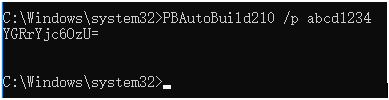
2) The password for SVN or Git must be an encrypted value
which is generated from the original password by executing
“PBAutoBuild210.exe /p”, as shown below.
Step 3: If the source code downloaded from SVN, Git, or
VSS is not the PBL file but objects in ws_objects, then you will
need to merge the objects to the PBL file. Locate the “Merging”
section in the exported build file and then configure as
below:
Setting “RefreshPbl” to true if you want to refresh the
PBL files by deleting and then generating the PBL files
again.
|
1 2 3 |
"Merging": [ {"Target": ".\Build\salesdemo.pbt", "LocalProjectPath": ".\Build", "RefreshPbl": false} ], |
At the same time, make sure to double check the target
location is set correctly in the “Projects” section, for
example,
|
1 2 3 4 5 6 7 |
"BuildJob": { "PreCommand": "", "Projects": [ <span><strong> </strong></span><span><strong>{"Target": ".\Build\salesdemo.pbt", "Name": "salesdemo_local"}</strong></span> ], "PostCommand1": "" } |
When the PBAutoBuild210.exe command is executed later, it
will first download the source code from the Git server and then
merge the source code.