Generating group headers
To generate the contents of the header section iteratively for
each group in a group DataWindow, check the Iterate Header for
Groups check box, or set the Export.XML.HeadGroups DataWindow
property. This property is on by default.
For example, consider a group DataWindow object that includes
the columns sales_order_id and sales_order_order_date. The following
screenshot shows the template for this DataWindow object:
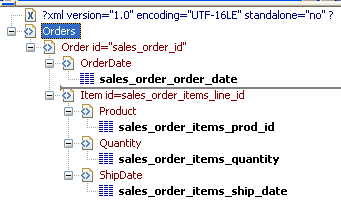
The root element in the Header section of the template,
Orders, has a child element, Order. Order has an id attribute whose
value is a control reference to the column sales_order_id. Order
also has a child element, OrderDate, that contains a column
reference to the sales_order_order_date column. These elements make
up the header section that will be iterated for each group.
The Detail Start element, Item, has an id attribute whose
value is a control reference to the column
sales_order_items_line_id. It also has three child elements that
contain column references to the line items for product ID,
quantity, and ship date.
When the DataWindow is exported with the Export.XML.HeadGroups
property on, the order ID and date iterate for each group. The
following XML output shows the first three iterations of the group
header:
|
1 2 3 4 5 6 7 8 9 10 11 12 13 14 15 16 17 18 19 20 21 22 23 24 25 26 27 28 29 30 31 32 33 34 35 36 37 38 39 40 41 |
<?xml version="1.0" encoding="UTF-16LE" standalone="no"?> <Orders> <Order id="2001"> <OrderDate>2002-03-14</OrderDate> <Item id="1"> <Product>300</Product> <Quantity>12</Quantity> <ShipDate>2005-09-15</ShipDate> </Item> <Item id="2"> <Product>301</Product> <Quantity>12</Quantity> <ShipDate>2005-09-14</ShipDate> </Item> <Item id="3"> <Product>302</Product> <Quantity>12</Quantity> <ShipDate>2005-09-14</ShipDate> </Item> </Order> <Order id="2002"> <OrderDate>2002-03-18</OrderDate> <Item id="2"> <Product>401</Product> <Qty>24</Qty> <ShipDate>2002-09-18</ShipDate> </Item> <Item id="1"> <Product>400</Product> <Qty>24</Qty> <ShipDate>2002-09-18</ShipDate> </Item> </Order> <Order id="2003"> <OrderDate>2002-03-21</OrderDate> <Item id="3"> <Product>400</Product> <Qty>12</Qty> <ShipDate>2002-09-23</ShipDate> </Item> ... |
For DataWindow objects with more than one group, when you
generate a new default template, each group after the first is
identified with a special icon and a check on the pop-up menu next
to the Starts Group Header item.
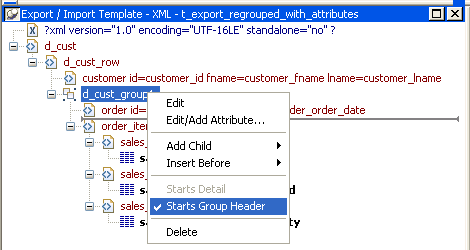
When the Iterate Header for Groups check box is selected, each
XML fragment in the header section between a Group Header element
and the next Group Header element or Detail Start element is
iterated.
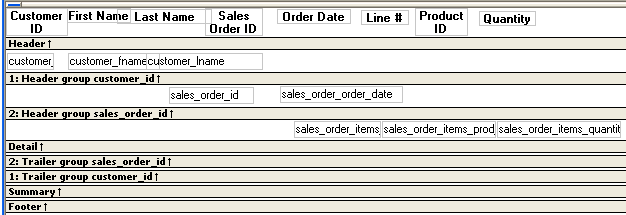
In the template shown in the previous illustration, sales are
grouped by customer ID, then by order ID. The customer group header
has attributes for the customer’s ID and first and last names. The
order group header has attributes for the order ID and date. The
following illustration shows the DataWindow in the Design
view:
The following XML output shows the first iteration of the
customer group header and the first and second iterations of the
order group header:
|
1 2 3 4 5 6 7 8 9 10 11 12 13 14 15 16 17 18 19 20 21 22 23 24 25 26 27 |
<?xml version="1.0" encoding="UTF-16LE" standalone="no"?> <d_customer> <customer id="101" fname="Michaels" lname="Devlin"> <order id="2001" date="1996-03-14"> <order_item> <sales_order_items_line_id>1</sales_order_items_line_id> <sales_order_items_prod_id>300</sales_order_items_prod_id> <sales_order_items_quantity>12</sales_order_items_quantity> </order_item> <order_item> <sales_order_items_line_id>2</sales_order_items_line_id> <sales_order_items_prod_id>301</sales_order_items_prod_id> <sales_order_items_quantity>12</sales_order_items_quantity> </order_item> <order_item> <sales_order_items_line_id>3</sales_order_items_line_id> <sales_order_items_prod_id>302</sales_order_items_prod_id> <sales_order_items_quantity>12</sales_order_items_quantity> </order_item> </order> <order id="2005" date="1996-03-24"> <order_item> <sales_order_items_line_id>1</sales_order_items_line_id> <sales_order_items_prod_id>700</sales_order_items_prod_id> <sales_order_items_quantity>12</sales_order_items_quantity> </order_item> </order> |