Garbage letters display when retrieving multibyte data
When retrieving multibyte data from the ASE database, garbage
data displays in the installable cloud app.
Cause:
The PowerServer installable cloud application connects to ASE
through the ODBC driver, while the PowerBuilder C/S app connects to
ASE through the native driver. When using the native driver, DBParm
supports the charset parameter (for
example, charset=’roman8′); however when using the ODBC driver, DBParm
does not support this parameter.
Solution:
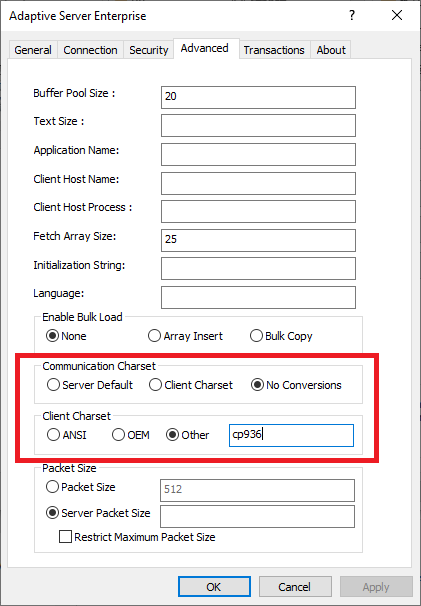
Set the charset setting in the ODBC data source configuration
page, for example,
cp852 — PC Eastern Europe
cp1250 — Microsoft Windows 3.1 Eastern European
cp869 — IBM PC Greek
cp1253 — MS Windows Greek
cp932 — IBM J-DBCS:CP897 + CP301 (Shift-JIS)
sjis — Shift-JIS (no extensions)
eucksc — EUC KSC Korean encoding = CP949
cp936 — Microsoft Simplified Chinese character sets