Font.Strikethrough
Description
A number that specifies whether the text should be crossed
out.
In the painter
Strikeout on the Font page in the Properties view.
Value
Values are:
-
0—Not crossed out
-
1—Crossed out
Example
The following statement is for the Font.Strikethrough property
of the emp_id, emp_fname, emp_lname, and emp_salary columns. The
status column must be included in the data source even though it does
not appear in the DataWindow object itself. The statement says that if
the employee’s status is L, which means On Leave, cross out the text
in the control:
|
1 |
If(status = 'L', 1, 0) |
An extra text control is included to the right of the detail
line. It becomes visible only if the status of the row is L (see Visible).
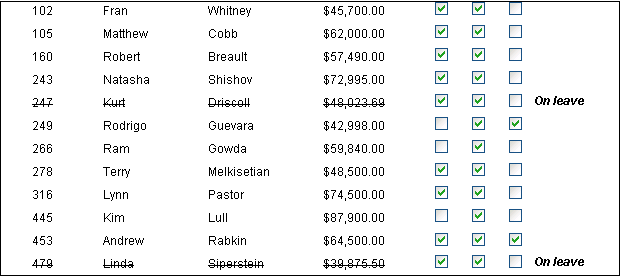
The following is a portion of the resulting DataWindow object.
It shows two employees who are On Leave. The four columns of
information show as crossed out: