Files available for source control
The following schema shows a directory structure for files in
the local PowerBuilder workspace and on the source control server.
File types in the local root path that can be copied to the source
control server from PowerBuilder are displayed in bold print. File
types displayed in normal print are not copied. Asterisks shown
before a file extension indicate variable names for files of the
type indicated by the extension. The asterisk included in a file
extension is also a variable. The variable for the extension depends
on the type of object exported from a PBL, so it would be “w” for a
window, “u” for a user object, and so on.
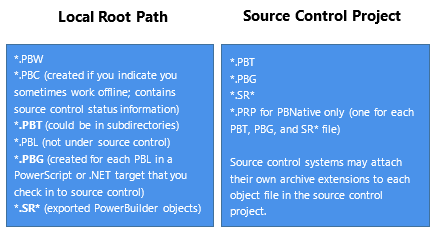
Typically, the source control server files are stored in a
database but preserve the file system structure. Files in any
deployment configuration directories can be regenerated
automatically by building and deploying the files in the Source
directory.
Temporary files in local root path
When you add or check in a PowerScript object to source
control, PowerBuilder first exports the object as a temporary file
(*.SR*) to your local target directory. For some source control
systems, you might choose to delete temporary files from the local
root path.