Example: using two DataStores to process data
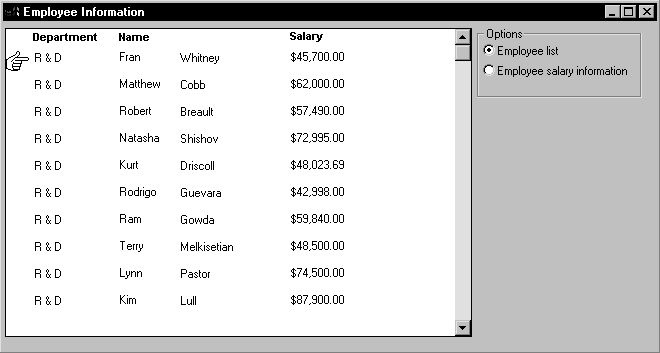
Suppose you have a window called w_multi_view that shows multiple
views of the same result set. When the Employee List radio button is
selected, the window shows a list of employees retrieved from the
database:
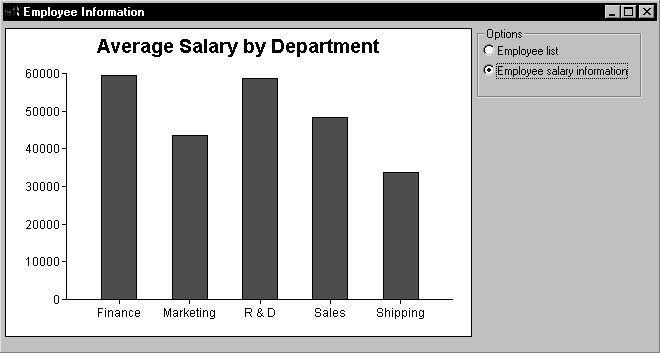
When the Employee Salary Information radio button is selected, the
window displays a graph that shows employee salary information by
department:
This window has one DataWindow control called dw_display. It uses
two DataStores to process data retrieved from the database. The first
DataStore (ids_emp_list) shares its result set with the second DataStore
(ids_emp_graph). The DataWindow objects associated with the two
DataStores have the same result set description.
When the window or form
opens
When the window or form opens, the application sets the mouse
pointer to the hourglass shape. Then the code creates the two DataStores
and sets the DataWindow objects for the DataStores. Next the code sets
the transaction object for ids_emp_list and issues a Retrieve method to
retrieve some data.
After retrieving data, the code shares the result set for
ids_emp_list with ids_emp_graph. The final statement triggers the
Clicked event for the Employee List radio button.
This code is for the window’s Open event:
|
1 2 3 4 5 6 7 8 9 10 11 |
SetPointer(HourGlass!) ids_emp_list = Create DataStore ids_emp_graph = Create DataStore ids_emp_list.DataObject = "d_emp_list" ids_emp_graph.DataObject = "d_emp_graph" ids_emp_list.SetTransObject(sqlca) ids_emp_list.Retrieve() ids_emp_list.ShareData(ids_emp_graph) rb_emp_list.EVENT Clicked() |
Code for the Employee List radio
button
The code for the Employee List radio button (called rb_emp_list)
sets the DataWindow object for the DataWindow control to be the same as
the DataWindow object for ids_emp_list. Then the script displays the
data by sharing the result set for the ids_emp_list DataStore with the
DataWindow control.
This code is for the Employee List radio button’s Clicked
event:
|
1 2 |
dw_display.DataObject = ids_emp_list.DataObject ids_emp_list.ShareData(dw_display) |
Code for the Employee Salary Information
radio button
The code for the Employee Salary Information radio button (called
rb_graph) is similar to the code for the List radio button. It sets the
DataWindow object for the DataWindow control to be the same as the
DataWindow object for ids_emp_graph. Then it displays the data by
sharing the result set for the ids_emp_graph DataStore with the
DataWindow control.
This code is for the Employee Salary Information radio button’s
Clicked event:
|
1 2 |
dw_display.DataObject = ids_emp_graph.DataObject ids_emp_graph.ShareData(dw_display) |
When the window or form
closes
When the window closes, the DataStores get destroyed.
This code is for the window’s Close event:
|
1 2 |
Destroy ids_emp_list Destroy ids_emp_graph |
Use garbage collection
Do not destroy the objects if they might still be in use by
another process — rely on garbage collection instead.