Example 3: creating a row indicator
This example demonstrates the use of several functions: Bitmap,
Case, CurrentRow, GetRow, and RGB.
What you want to do
Using the Employee table in the Enterprise Application Sample
Database, you create a DataWindow object using the Emp_id, Emp_fname,
Emp_lname, and Salary columns.
In the painter, you want to display a number of items such as the
number of the current row, an arrow that is an indicator of the current
row, and the salary for an employee with a background color that depends
on what the salary is.
How to do it
In the workspace, add the following:
-
A computed field CurrentRow( ), which displays the number of
the current row. -
A picture object, which is a right-arrow, for which you define
an expression for the arrow’s visible property:1If(CurrentRow()= GetRow(), 1, 0)The expression causes an arrow to display in the current row
and no arrow to display in other rows. -
A computed field using the If, CurrentRow, and GetRow
functions:1If(CurrentRow() = GetRow(),"Current","Not current")displays the word “Current” when the row is the current row
and “Not current” for all other rows. -
A computed field (typed on one line) using the Bitmap,
CurrentRow, and GetRow functions:1Bitmap(If(CurrentRow()= GetRow(), "c:samplexcodeindicatr.bmp", " "))displays an arrow bitmap for the current row and no bitmap for
all other rows. -
An expression for the Background.Color property of the salary
column:123Case(salary WHEN IS >60000 THEN RGB(192,192,192)WHEN IS >40000 THEN RGB(0,255,0) ELSERGB(255,255,255))The expression causes a salary above $40,000 to display in
green, a salary above $60,000 to display in gray, and all other
salaries to display in white.
What you get
Here is what the design of the DataWindow object looks
like:
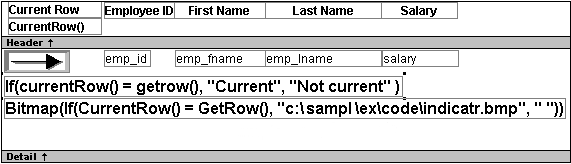
Here is what the data looks like with the second row
current.
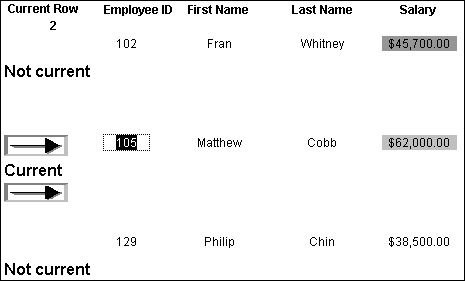
Notice that the number of the current row is 2; the first row and
the third row are “Not current” (and therefore display no bitmap); and
the second row, which is the current row, displays the arrow row
indicator.
On your screen, the salary in the first row has a green background
because it is more than $40,000; the salary in the second row has a gray
background because it is more than $60,000; and the salary in the third
row has a white background, which matches the background of the
DataWindow object.