Example 1: counting null values in a column
A null value is a marker used to fill a place in a column where
data is missing for any reason. The value might not be applicable, or it
might be missing or unknown. When a database table is created, each
column in the table either allows null values or does not allow them.
The column or set of columns that define the primary key cannot allow
null values. Sometimes it is useful to know how many null values there
are in a particular column.
What you want to do
Suppose you are working with the Fin_code table in the Enterprise
Application Sample Database. The Fin_code table has three
columns:
|
Column |
What the column is |
Allows null values? |
|---|---|---|
|
Code |
Unique financial identifier (primary |
No |
|
Type |
Code type: expense or revenue |
No |
|
Description |
Code description: the department incurring the |
Yes |
You create a DataWindow object using the Code and Description
columns. You want to know the number of null values in the Description
column.
How to do it
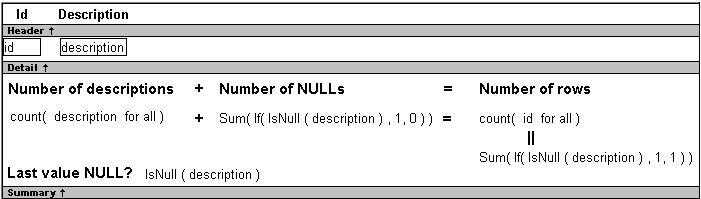
In the DataWindow object, you create a computed field that uses
functions to display the number of null values in the Description
column.
For the sake of demonstrating the use of functions, the following
computed fields are created in the Summary band of the DataWindow
object (with text objects that tell you what information each computed
field is providing):
|
1 |
Count(description for all) |
counts the number of descriptions (that are not null);
|
1 |
Sum(If(IsNull(description), 1, 0)) |
returns a 1 if the description column is null, a 0 if the
description column is not null, and then adds the total;
|
1 |
Count(id for all) |
counts the number of IDs (which is also the number of
rows);
|
1 |
Sum(If(IsNull(description), 1, 1)) |
adds the number of nulls and not nulls in the description column
(which is the total number of rows) and should match the result of
the
Count( id for all ) function; and
|
1 |
IsNull(description) |
evaluates whether the last row in the table has a description that
is null. The return value of the IsNull function is true or
false.
What you get
Here is the design for the DataWindow object.
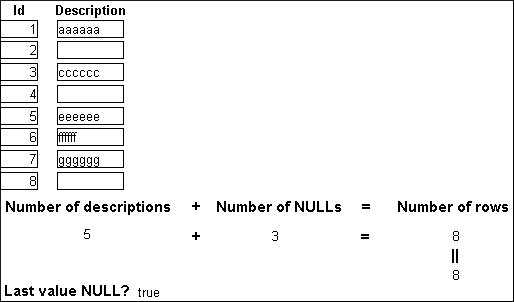
Here is the DataWindow object showing eight descriptions, three of
which are null and five of which are not null. The last description for
Id=8 is null.