Error calling external object function of an oleobject
Symptom
Using OLE to connect to the Quick Books CoreObjX70PB activex
control and getting an error calling the Connect function.
Environment
PowerBuilder
Reproducing the Issue
The following code was used to connect to the
CoreObjX70PB.QBConnection: The Connect function is where the error
message was being thrown.
|
1 2 3 4 5 6 7 8 9 10 11 12 13 14 15 |
long ll_rtn stringls_reg = "" string ls_path = "C:Temp" ls_path = "" string ls_app = "QBApp" integer li_mode = 2 string ls_text, ls_listID oleobject myole myole = create oleobject ll_rtn = myole.connecttonewobject("CoreObjX70PB.QBConnection") IF ll_rtn = 0 then ll_rtn = myole.Connect(ls_str , ls_app, li_mode, ls_reg) END IF |
Cause
The error was due to the fact that this was a first time
connection to the CoreObjX70PB.QBConnection object. The customer
determined that Quick Books was set up to run as multiuser. They had to
set it back to single user in order to connect.
See the “Resolution” section below to see how to get the actual
error message being returned by the oleoject.
Solution
Do the following to get the actual error message from the
oleobject:
1. Instead of using an oleobject variable create a PowerBuilder
standard class non-visual object (nvo) of type oleobject:
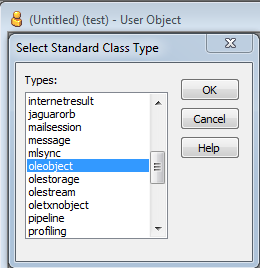
2. Code a messagebox in the externalexception event of the
nvo. Capture the resultcode and description of the externalexception
event:

3. When the following code executes, the oleobject error from the
externalexception event will display in the messagebox:
|
1 2 3 4 5 6 7 |
n_myole myole myole = create n_myole ll_rtn = myole.connecttonewobject("CoreObjX70PB.QBConnection") IF ll_rtn = 0 then ll_rtn = myole.Connect(ls_str , ls_app, li_mode, ls_reg) END IF |