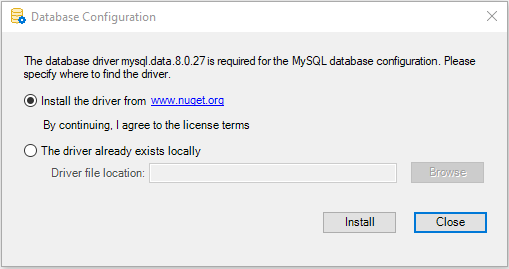
Download the database driver
You must select the database provider and agree to the driver
license terms as the driver must be downloaded from the NuGet site to
the development PC and PowerServer later. Unlike the traditional
client/server app which directly connects with the database through a
local driver, the installable cloud app relies on the PowerServer Web
APIs and the .NET Core database provider in PowerServer to connect
with the database.
To agree to download the database driver:
-
Select the Database page in
the PowerServer project painter. -
Select the database provider from the Provider list.
-
In the Database driver
option group, click the View License
Terms link to view the license first and then select
the option “I have read and agree to the
license …“.
If you select DB2, MySQL, Oracle,
or Informix from the Provider listbox, you will be asked to specify
the location of the .NET Core driver or allow PowerBuilder to download
the required driver from the NuGet website to the development
PC.
Note
You can manually download the following .NET Core driver from
the NuGet website or have PowerBuilder automatically download the
driver from the NuGet website:
-
MySql.Data 8.0.27 for MySQL
-
Oracle.ManagedDataAccess.Core 3.21.50 for Oracle
-
IBM.Data.DB2.Core 3.1.0.500 for Informix and DB2
The packages downloaded from the NuGet website will be stored to
%USERPROFILE%.netdbdrives; they will be automatically loaded when
the database connection is created in the PowerBuilder IDE.