Displaying the PowerBuilder extended attribute system
tables
PowerBuilder updates the extended attribute system tables
automatically whenever you change the information for a table or column.
The PowerBuilder extended attribute system tables are different from the
system tables provided by your DBMS.
You can display and open PowerBuilder extended attribute system
tables in the Database painter just like other tables.
To display the PowerBuilder extended attribute system
tables:
-
In the Database painter, highlight Tables in the list of
database objects for the active connection and select Show System
Tables from the pop-up menu.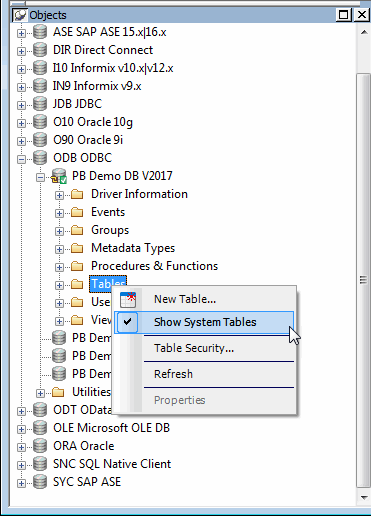
-
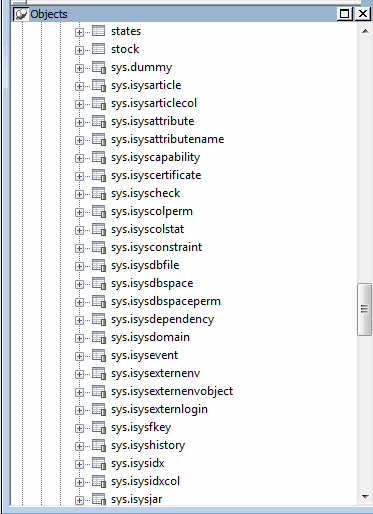
The PowerBuilder extended attribute system tables and DBMS
system tables display in the tables list, as follows:-
PowerBuilder system tables
The five system tables are: pbcatcol, pbcatedt, pbcatfmt,
pbcattbl, and pbcatvld. -
DBMS system tables
The system tables supplied by the DBMS usually have a
DBMS-specific prefix (such as sys or dbo).
-
-
Display the contents of a PowerBuilder system table in the
Object Layout, Object Details, and/or Columns views.For instructions, see the section called “Appendix A. The Extended Attribute System Tables” in Users Guide.
Do not edit the extended attribute system tables
Do not change the values in the PowerBuilder extended
attribute system tables.