Defining multiple data sources for the same data
When you define an ODBC data source in PowerBuilder, each data
source name must be unique. You can, however, define multiple data
sources that access the same data, as long as the data sources have
unique names.
For example, assume that your data source is a SQL Anywhere
database located in C:SQL AnywhereSALES.DB. Depending on your
application, you might want to specify different sets of connection
parameters for accessing the database, such as different passwords and
user IDs.
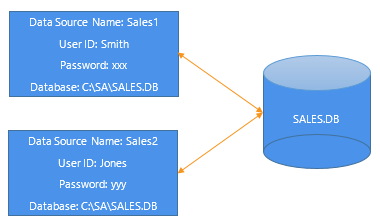
To do this, you can define two ODBC data sources named Sales1 and
Sales2 that specify the same database (C:SQL AnywhereSALES.DB) but use
different user IDs and passwords. When you connect to the data source
using a profile created for either of these data sources, you are using
different connection parameters to access the same data.
Figure: Using two data sources to access a database