Defining actions
Often users want to add buttons (CommandButtons or PictureButtons)
to a form created using a custom form style. When you create the form
style, you specify what the added buttons can do by defining actions for
the form style. When users place a button, they select the desired
action from a list:
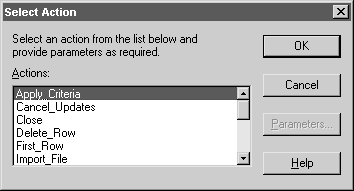
Actions are implemented as public window-level functions.
To define an action:
-
In the Script view in the Window painter, select
Insert>Function from the menu bar. -
Define the window-level function (for how, see Users Guide).
If you want the window function to be available to a form user
as an action, be sure to define the function as public. Function
arguments you define are used as parameters of the action. Each
public window function you define is listed as an action in the
Select Action dialog box in the Form painter.Defining functions not available as actions
If you want to define and use window functions that are not
available as actions in forms, define them as private.