Define a retrieval
argument
Now you define a retrieval argument.
-
Select Design>Retrieval Arguments from the menu bar.
The Specify Retrieval Arguments dialog box displays.
-
Type cust_id in the Name box.
The default data type is Number, which is what you
want.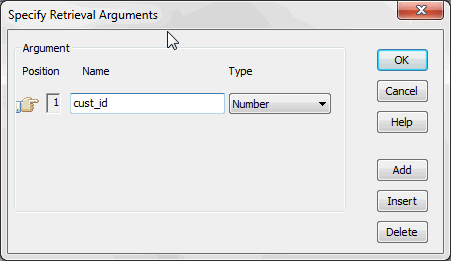
About retrieval argument names
You can choose any name you want for the retrieval argument;
it is just a placeholder for the value you pass during execution.
Nonetheless, it is a good idea to make the name meaningful. -
Click OK.
The retrieval argument is defined.
Document get from Powerbuilder help
Thank you for watching.
Subscribe
Login
0 Comments
Oldest