DataWindow recovery from an unexpected transaction disconnect
PB
Symptom
Customer is using an OCX that causes the application to crash, due
to a database driver issue. Until the database vendor corrects the
driver issue, we have given them a workaround requiring them to
disconnect from and reconnect to the database. Unfortunately, this
terminates the transaction object connection and they need a way to
reconnect their DataWindows.
Environment
OS: Windows 7 64-bit PowerBuilder Database: Informix 11.5
Reproducing the Issue
The following steps will demonstrate how to reproduce the
issue:
-
Download DWrecovery.zip.
-
Unzip DWrecovery.zip into a local directory
-
Open mdi.pbw workspace in PB IDE
-
Run the application
-
Select File > New > Untitled for Sheet1
-
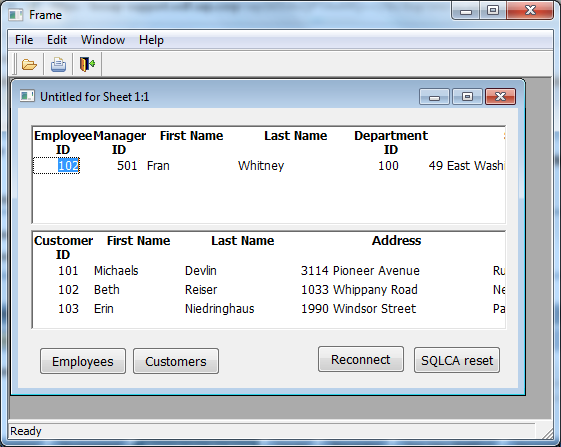
Display shows two populated DataWindows
-
Left-click on “Employees” command button
-
The top DataWindow will clear and eventually repopulate
-
Left-click on “Reconnect” command button
-
Left-click on “Employees” command button
-
A DataWindow error will appear since DiSCONNECTing and
CONNECTing to the database will cause Transaction Objects to
disconnect as well.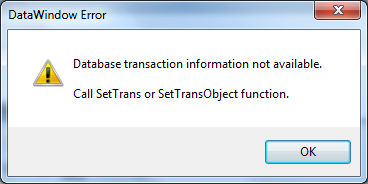
Cause
Once the database disconnect occurs, all DataWindow Transaction
objects will point to an invalid connection.
Solution
You can reset all DataWindows by reconnecting to the database and
cycling through all open sheets to locate and reset all Transaction
Objects: In the sample application, if you click on the “SQLCA
Reset”command button after the earlier failure, the Transaction Objects
will be restored on all DataWindows.
The initial call would be to a global function that looks for open
sheets and by calling a function that resets the Transaction Object on
all DataWindows restoring a valid database connection.
|
1 2 3 4 5 |
integerli_opensheet, li_opensheets li_opensheets = UpperBound(inv_sheetmgt.iw_opensheets) for li_opensheet = 1 to li_opensheets of_settransaction(inv_sheetmgt.iw_opensheets[li_opensheet], SQLCA) next |
The of_setransaction function would be coded as follows:
It has 2 parameters:
|
1 2 |
as_window of type window as_transaction of type transaction object |
PowerScript:
|
1 2 3 4 5 6 7 8 9 |
integerli_control, li_controls WindowObjectlwo_control[] lwo_control[] = as_window.Control[] li_controls = UpperBound(lwo_control) For li_control = 1 TO li_controls IF lwo_control[li_control].TypeOf() = DataWindow! THEN lwo_control[li_control].DYNAMIC SetTransObject(as_transaction) END IF NEXT |