Controlling display
You control table display and style sheet usage through the
HTMLTable.GenerateCSS property. The HTMLTable.GenerateCSS property
controls the downward compatibility of the HTML found in the HTMLTable
property. If HTMLTable.GenerateCSS is FALSE, formatting (style sheet
references) is not referenced in the HTMLTable property; if it is TRUE,
the HTMLTable property includes elements that reference the cascading
style sheet saved in HTML.StyleSheet.
This screen shows an HTML table in a browser using custom display
features:
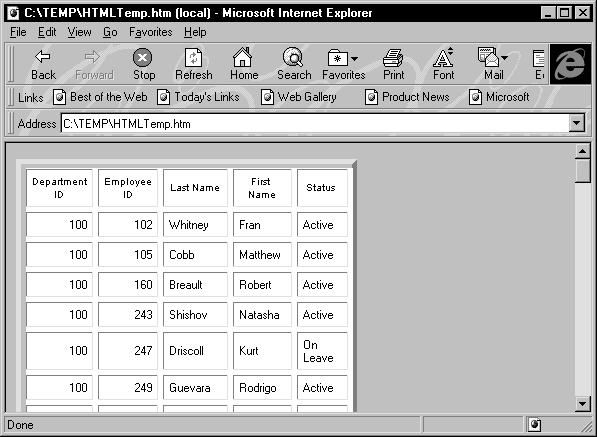
HTMLTable.GenerateCSS is
TRUE
If the HTMLTable.GenerateCSS property is TRUE, the HTMLTable
element in the HTMLTable property uses additional properties to
customize table display. For example, suppose you specify the following
properties:
|
1 2 3 4 5 |
HTMLTable.NoWrap=Yes HTMLTable.Border=5 HTMLTable.Width=5 HTMLTable.CellPadding=2 HTMLTable.CellSpacing=2 |
Describe, Modify, and dot notation
You can access these properties by using the Modify and Describe
PowerScript methods or by using dot notation.
The HTML syntax in the HTMLTable property includes table
formatting information and class references for use with the style
sheet:
|
1 2 3 4 5 6 7 8 9 10 |
<table cellspacing=2 cellpadding=2 border=5 width=5> <tr> <td CLASS=0 ALIGN=center>Employee ID <td CLASS=0 ALIGN=center>First Name <td CLASS=0 ALIGN=center>Last Name <tr> <td CLASS=6 ALIGN=right>102 <td CLASS=7>Fran <td CLASS=7>Whitney </table> |
HTMLTable.GenerateCSS is
FALSE
If HTMLTable.GenerateCSS is FALSE, the DataWindow does not use
HTMLTable properties to create the Table element. For example, if
GenerateCSS is FALSE, the HTML syntax for the HTMLTable property might
look like this:
|
1 2 3 4 5 6 7 8 9 10 |
<table> <tr> <th ALIGN=center>Employee ID <th ALIGN=center>First Name <th ALIGN=center>Last Name <tr> <td ALIGN=right>102 <td>Fran <td>Whitney </table> |
Merging HTMLTable with the style
sheet
The HTML syntax contained in the HTMLTable property is incomplete:
it is not wrapped in <HTML></HTML> elements and does not
contain the style sheet. You can write code in your application to build
a string representing a complete HTML page.
PowerBuilder example
This example sets DataWindow properties, creates an HTML string,
and returns it to the browser:
|
1 2 3 4 5 6 7 8 9 10 11 12 13 14 15 16 17 |
String ls_html ds_1.Modify & ("datawindow.HTMLTable.GenerateCSS='yes'") ds_1.Modify("datawindow.HTMLTable.NoWrap='yes'") ds_1.Modify("datawindow.HTMLTable.width=5") ds_1.Modify("datawindow.HTMLTable.border=5") ds_1.Modify("datawindow.HTMLTable.CellSpacing=2") ds_1.Modify("datawindow.HTMLTable.CellPadding=2") ls_html = "<HTML>" ls_html += & ds_1.Object.datawindow.HTMLTable.StyleSheet ls_html += "<BODY>" ls_html += "<H1>DataWindow with StyleSheet</H1>" ls_html += ds_1.Object.DataWindow.data.HTMLTable ls_html += "</BODY>" ls_html += "</HTML>" return ls_html |
This technique provides control over HTML page content. Use this
technique as an alternative to calling the SaveAs method with the
HTMLTable! Enumeration.