Connecting over Named Pipes
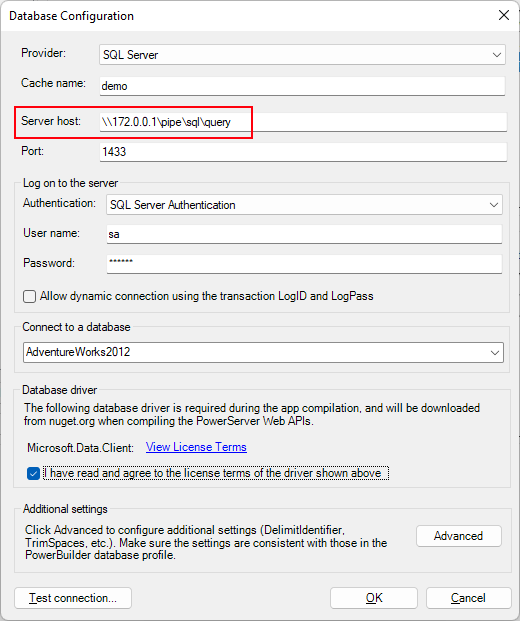
To create a database connection cache for the SQL Server
database over the Named Pipes protocol:
Specify the Server host field
according to the following connection strings:
|
1 |
Data Source=\.pipesqlquery;Initial Catalog=MyDB;User ID=sa;Password=mypwd; |
|
1 |
Data Source=\.pipeMSSQL$MSSQLSERVER01sqlquery;Initial Catalog=SnapTest;User ID=sa;Password=mypwd; |
|
1 |
Data Source=np:\172.0.0.1pipesqlquery;Initial Catalog=SnapTest;User ID=sa;Password=mypwd; |
|
1 |
Data Source=np:MyMachineName;Initial Catalog=MyDB;User ID=sa;Password=mypwd; |
Tips:
You can check which protocol is currently used by executing
the following SQL statement:
|
1 |
SELECT net_transport FROM sys.dm_exec_connections WHERE session_id =@@SPID; |
You can specify the protocol in the server host by adding the
following prefix before the server name: np:, tcp:, or lcp:.
If you add the “tcp:” prefix to the server host, then TCP/IP
protocol will be used even though it connects with a local
database.
If the server host is entered with an IP address, even if the
“lcp:” prefix is added, it will still connect to the database over
TCP/IP.
If you want to connect to the specified instance, you can add
“”+”instance name” to the server host, for example
“.MSSQLSERVER01”.