Configuring Windows Defender Firewall
If Windows Defender Firewall or any antivirus tool is turned on,
make sure to configure them to allow the database server port
(2638 in this tutorial or the port
number you choose to use) to go through, otherwise, connection errors
may occur.
You would need to configure the firewall/antivirus settings on
the following servers:
-
Database server — to allow the database server port (2638
in this tutorial) -
Web server — to allow the server port (5009 in this
tutorial)
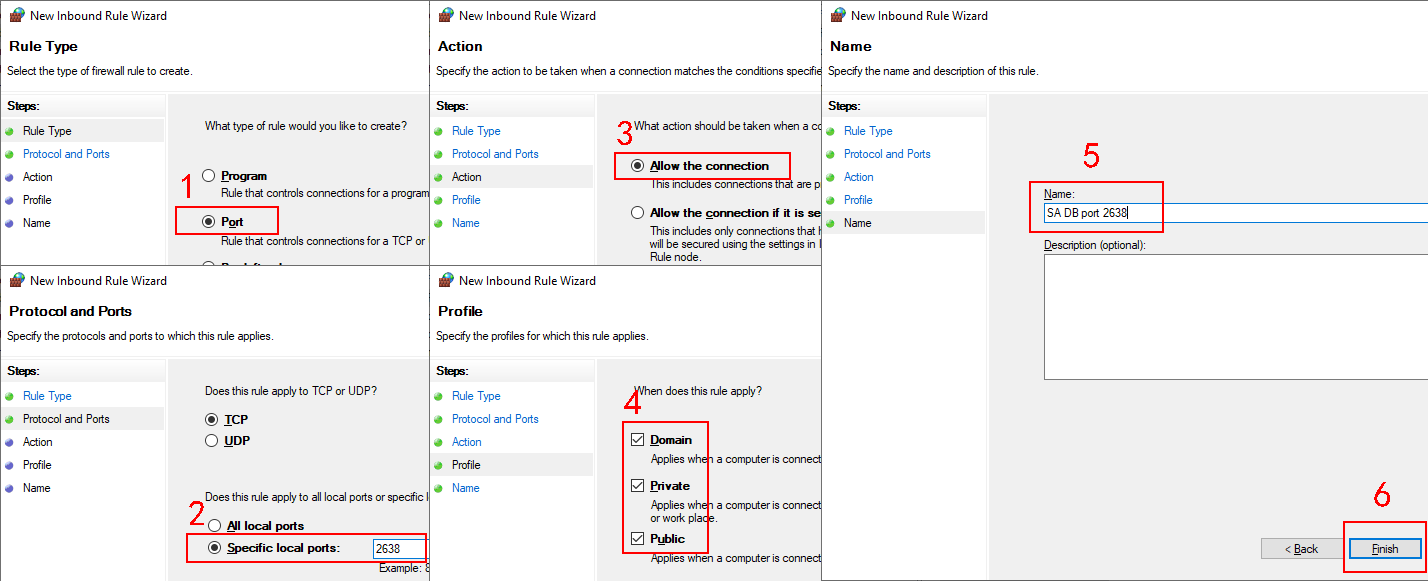
The following steps configure the firewall settings on the
database server (you can take the same steps to configure the other
servers):
Step 1: Open Windows Defender Firewall and then click Advanced settings.
Step 2: Select Inbound Rules
and then click New Rule.

Step 3: Create a new rule which allows connections through the
database server port (2638 in this tutorial).