Configuring Fiddler
For the first time you run Fiddler, make sure to enable logging
for HTTPS traffic with the following steps:
-
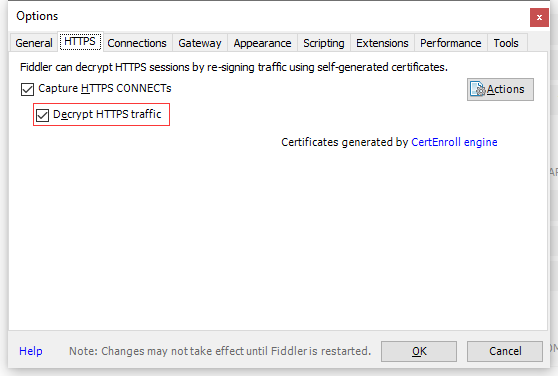
Click Tools > Fiddler Options > HTTPS.
-
Click the Decrypt HTTPS Traffic box.
-
In the popup dialog that asks you whether you trust the
Fiddler Root certificate, click Yes.
By default, Fiddler does not capture and decrypt the secured HTTPS
traffic. To capture data sent through HTTPS, the HTTPS traffic
decryption must be enabled.
For more configuration settings on Fiddler, you may refer to:
https://docs.telerik.com/fiddler/.
Document get from Powerbuilder help
Thank you for watching.
Subscribe
Login
0 Comments
Oldest